The Referral is the core object around which all the different records for the patient's episode of care are linked to.
It is the referral that allows a Provider to record information about their patient. Without a referral no clinical or financial records can be saved.
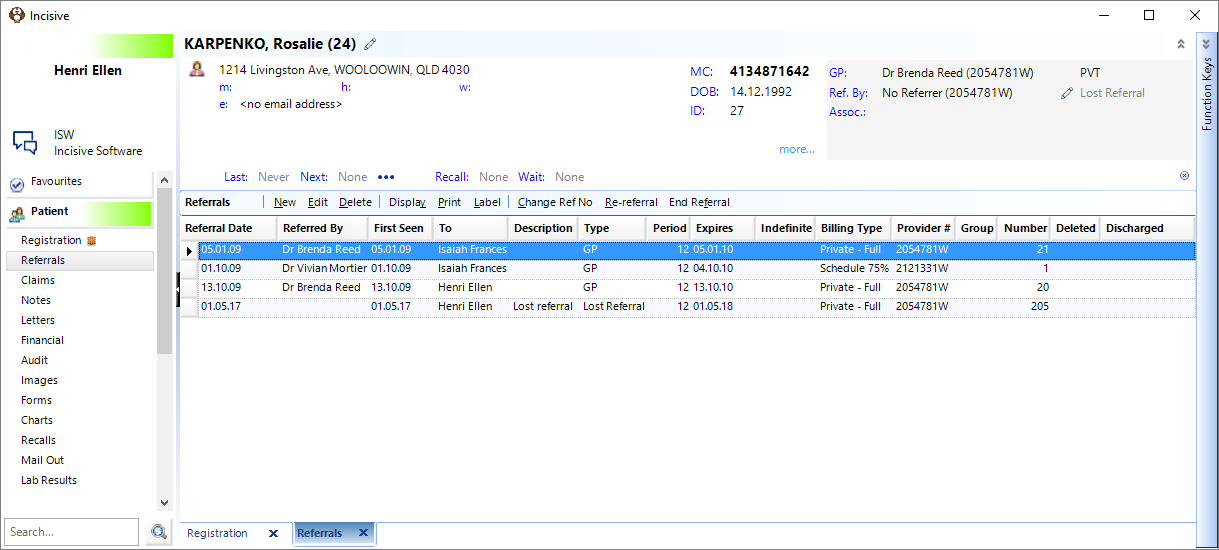
Referral displays all referrals for the selected patient, regardless of Provider. A single line display for each referral shows the date, the user referred to, who the patient was referred by and whether the referral is available to the Group, and the Referral Number.
For more details on the selected Referral, press the Space bar.
If you have just entered a New Patient (either via Patient Mode or Appointment Mode), then the New Referral screen will appear automatically as it is assumed that you will want to add the details of the referral along with the Registration information. If this is not the case, then refer to the steps below to add a new referral.
Appointments made using the 'Quick Appointments' option will not have a referral created. The referral will need to be entered when the patient presents for the first time.
New | Create a new referral |
Edit | Edit an existing referral |
Delete | Delete a referral a referral can only be deleted if there are no records (letters, financials etc.) already linked to the referral. |
Display | Displays all the referral entries for the patient, including Deleted referrals. |
Print a list of the referral entries for the patient | |
Label | Print a label |
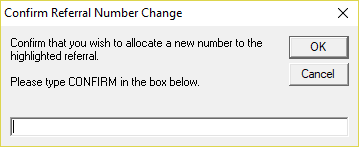
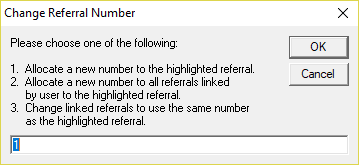
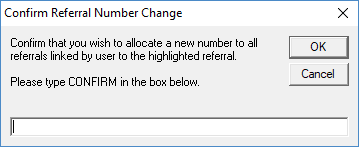
Change Ref. No. | This allows you to assign a new number to the referral or referrals. If you are filing paper based records based on a referral number, proceed with caution.
|
Re-referral | This option is rarely used except in day-stay facilities for elderly patients. |
End Referral | Mark the episode of care related to the referral are completed. |
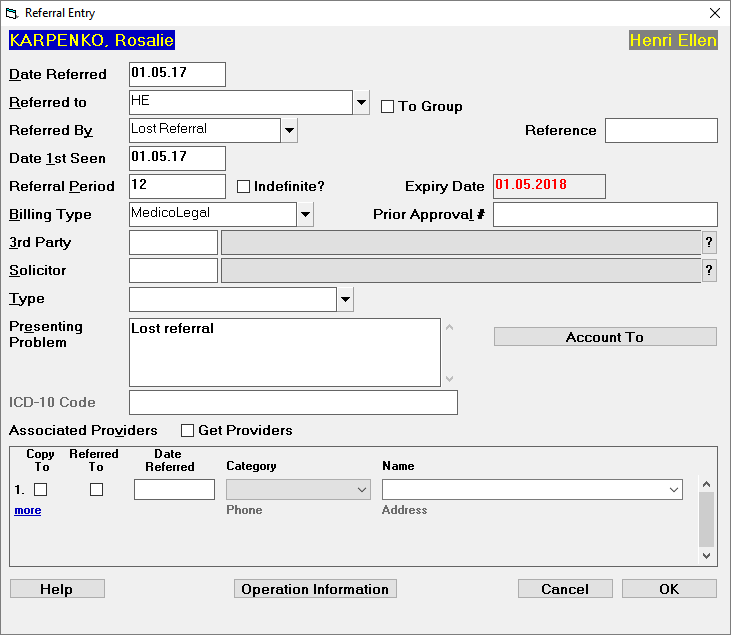
Date Referred | This can be either:
Using the Date of the Referral (letter) is the preferred method. |
Referred To | Select from the list of Providers. |
To Group | If the referral is not to a specific Provider and can be used by any or all of the Providers in a 'Group', you can check this option on to allow any of the Providers in the Group to create new records against the patient. If this option is being used then you should also have a Role that allows all of the Providers to view each others clinical records about the patient. Use the 'Display' option in Notes to view the clinical records relating to the patient. This option can be permanently on for every referral. Configure it in Setup > Provider > Config 3 |
Referred By | There is a list of the common sources of referrals or you can create new Contacts Categories which will appear in the selection list and will extend your options for reporting and analysis purposes. If GP is selected then the patient's GP will be automatically inserted. If Self-referred is selected then this text is inserted as the Referral Type If GP Other or any other Referral Type that has been added, you will be presented with the Contacts screen which allows you to select an existing contact or add a new one. If GP Locum enter the details as requested. If you are not sure who the referral will be from we advise you should create a new 'Contact' called 'TBA' (To Be Advised) and then update the referral when you receive the referral documentation. |
Reference | This is a text field that can be used to record the ID of the referral request. It's use is OptionalFor Australian Defence Force patients record the DAN number in this field. |
Date 1st Seen | By default, the Date of Referral is automatically entered from the patient's next Appointment date. If the appointment date changes then you will need to manually change the date in this field. If you are using the 'Quick Appointments' option the date will not be automatically entered into this filed however the date will be inserted when the patient's Status is marked as 'Arrived' The date in this field is used for a number of different analysis and reporting functions. The display of this field is optional and can be turned on/off for each Provider in Setup > Provider > |
Referral Period | The Referral Period can be automatically entered dependent on the setting in the Contact Category. This field is optional and can be hidden. Configure the setting in Setup > Provider > Config 3 |
Indefinite | Select this if the referral will not expire |
Expiry Date | If the Referral Period is enabled then the Expiry Date of the referral is calculated by adding the Referral period to the date entered into the Date Referred field. |
Billing Type | A Billing Type is linked to rules involved with the invoicing of a patient. Instead of having to remember all the different fees charged to the different parties you can preset the charges so that the invoice is constructed using the correct charges. Usually the Billing Types will be created for contractual purchasing arrangements such as ACC or Health Fund Agreements or can be for different charges scenarios e.g. Private - Full or Private - Pensioner Create Billing Types in Setup > Financial > Billing Types. Billing Types are System wide - that is - if changes are made they will affect everybody. Permissions to modify Billing Types should be sparingly given. |
Prior Approval | Enter the Prior Approval number if required by the health funder. |
3rd Party | If the selected Billing Type is configured to prompt for a 3rd Party selection then you have the option to select the party so that it is preconfigured when producing the invoice. |
Solicitor | If the selected Billing Type is configured to prompt for a Solicitor selection then you have the option to select the party so that it is preconfigured when producing the invoice. |
Type | You can build a selection list to associated this referral with your custom Categories. Some people like to differentiate Public & Private patients; others use it to record the marketing source the patient used when choosing the facility. The list can either store new entries as they are typed into the list or you can create the list of referral types to select from in Setup > Selection Lists > Patient Type The field can be hidden using the option in Setup > Provider > Config 3 |
Presenting Problem | Enter in some information on what problem the patient is reporting.When booking an operation the Operation Description will be automatically entered in here as the booking is created. |
Account To | Use this field to enter in the name and address of a party that you will be sending the invoice to but is not in your Contacts and you do not want to add them to it as it is very unlikely you will be involved with them again. |
ICD-10 Code | This field has historical use for audit purposes |
Associated Providers | Record the other parties who are involved with this patient for this episode of care. Common examples are physiotherapists, optometrists, cardiologists etc. You can indicate that you are referring the patient to the other party (Referred To option) or that you want the listed associated providers to be included in correspondence (Copy To option). When create a letter you can select 'Associated Providers' and they will all receive a copy of the letter. |
Get Providers | This option will look at the list of Associated Providers that were recorded in the patient's previous referral and insert them into the current referral. |
OPERATION INFORMATION
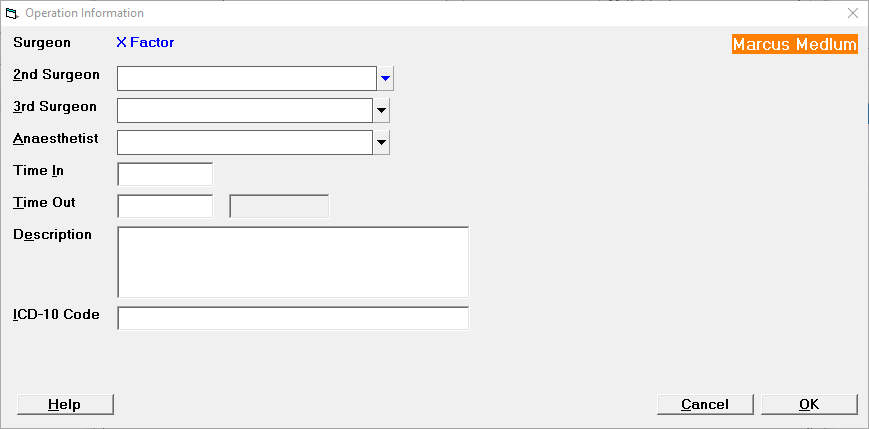
Surgeon | |
2nd Surgeon | |
3rd Surgeon | |
Anaesthetist | |
Time In | |
Time Out | |
Description | |
ICD-10 Code |