Select 'New'.
The New Referral screen will display.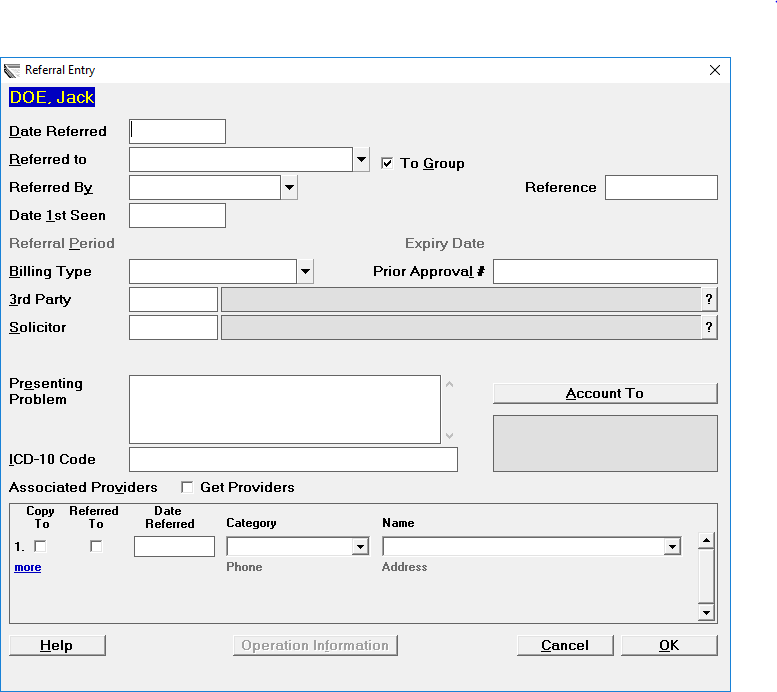
- The date entered should be the date the patient is first seen for this referral.
- Press Enter for today's date or type the date. If the referral details are being completed from Appointment Mode, then this will default to the date of the appointment.
- Select which User the patient is being referred to.
- Select from the list the appropriate referred by category, and depending on the category chosen, someone from the address file.
- Select the Billing type and optionally the 3rd Party that is to be billed.
- Record an ICD-9 Code if necessary.
- Select 'OK'.
Referred By
The list in the referred by field comes with 3rd Party, ACC, GP, GP Locum, GP Other, Self-Referred and Specialist as standard. Other categories can be added via Set-up - Selection Lists – Category, see page for further details.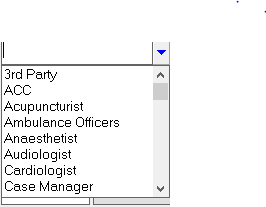
Locum Referrals
If you select one of the Locum Referral options listed above, then a box similar to the one below will appear into which you can type the locum's name.
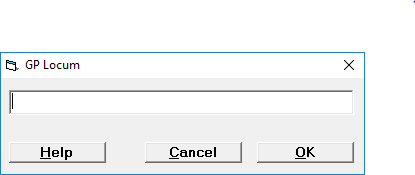
This allows you to record the Locum's name, without having to add the locum as an entry in your address file.
- Type in the locum's name as you wish it to appear in letters.
- Select 'OK'.
Correspondence to the referring doctor will automatically come out addressed to the locum, along with the address details of the GP. For example:
Dr Susan Bradley
Locum to Dr Paul Smith
The Medical Centre
Main Road
Anywhere
On this Page: