The Contact Categories tab displays a list of existing categories, together with some information about the category.
Categories
All Correspondence Contacts are assigned to a category, for example Physiotherapist, GP, Orthopaedic Surgeon etc. This is to filter contacts when entering referrals etc. At the time of entering a Referral a "Referred By" Category is chosen from the categories that you set up here.
Though should be given to the categories created. If too many are created, staff may have difficulty locating a Contact (because the wrong Category is selected). To few, and the number of contacts from which to choose will be too great.
Create categories based on your Providers specialty. Their colleagues can then be allocated to this category, i.e Orthopaedic Surgeon. For other specialties, it may be preferable to have a single category such as 'Specialist'.
Add a New Category
- From Contact Categories select 'New'.
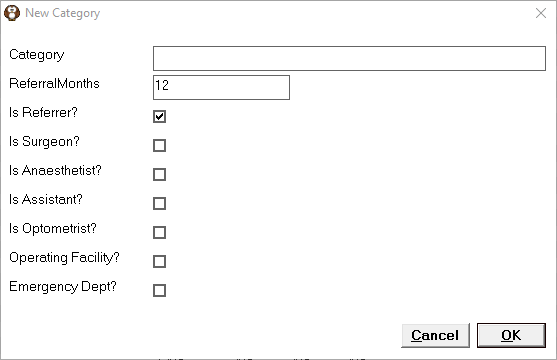
- Complete the fields as applicable for the Category that you are adding.
- Select OK to save the entry.
Category | Type the Category Name. This can be up to 50 characters although keep in mind the length if you require this to print, particulary on labels. |
Referral/Months | Enter the number of months that the referral is valid for if applicable. For Australia, this should be set to 12 months for GP's and 3 months for specialists. |
Is Referrer? | If this category refers patients, check this option on. If the category does not refer patients, leave it off (i.e. Suppliers etc.). When entering referrals, the list of categories will be filtered to only those categories with this option enabled. |
Is Surgeon? | Currently this field is not in use. |
Is Anesthetist? | Currently this field is not in use. |
Is Assistant? | Currently this field is not in use. |
Is Optometrist? | This is for the 'Exam Details' section in the Ophthalmic Charts module. |
Operating Facility? | Contacts that belong to a Category designated an Operating Facility (or rooms facility) can be linked to Appointment Sessions. You may have more than one category designated as an Operating Facility. Create one category 'Consulting Rooms' and another 'Operating Facilities / Locations' or similar. |
Emergency Dept? | If this Category is an Emergency Department, check this option on. At the time of entering a referral, after selecting the Hospital, you will be prompted to enter the Locum name. When typing a letter to the Referring doctor, the locum name will be included. |