There is a function in SPM to order Laboratory, Radiology, Physiotherapy or any other type of request. The order is logged against the patient and a printout can be generated to attach to the Laboratory, Radiology or Physiotherapy practice requisition form.
A set of standard tests is already in the database. Each Specialist can choose the tests they will frequently use. Templates can be created for standard groups of tests e.g. preop assessment, renal screening, and antenatal screening. Additional non-standard tests can be added to the master list. Each practice can nominate the Laboratories, Radiology, Physiotherapy practices use and the requisition will be addressed to the appropriate site.
Receipt of test results, received either electronically or manually, are marked off against the ordered tests. A report is available to indicate any results that have not been received.
Order requests are created in the patient's file.
- F4 to select the Patient, go to the Notes tab and select the Order Test Button.
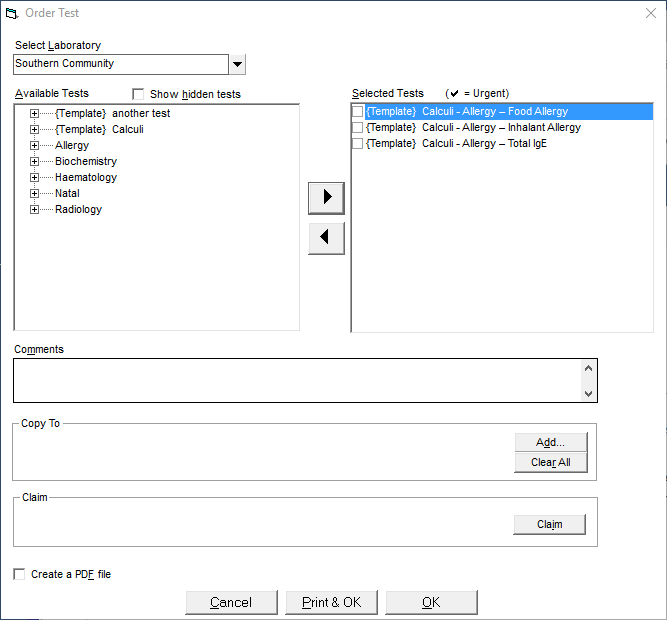
- Choose the provider of the service (laboratory, radiology or physiotherapy facility) from the drop down list.
Select the appropriate tests or test templates and move them across to the Selected Test box on the right but clicking on the
 arrow..
 If further tests are required and are not listed then tick the Show Hidden tests option or add them to the lookup list in Setup
Enter any additional text into the Comments section that you want included in with the Test Order.
Frequently used text can be created as an F8 'Quick-code' for in Setup > Templates > Letters.
- If you want to email the Order to the patient you can choose the 'Create a PDF file' option, which will create and save a pdf document that you can then attach to an email.
- Complete the required fields and Print & OK.
Tests Ordered now appear on the Notes tab for that patient.