The Patient header is a section at the top of every screen in the Patient module that displays a summary of information about the selected patient.
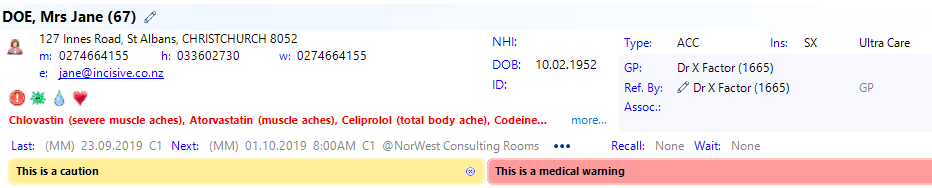
Icons:
| Collapse the patient header to just display the patient name. |
| This allows you to edit either the Patient Registration or the Referral |
| This allows you to send an SMS (text) message if there is a mobile phone number and the Provider is configured to send SMS messages. Optionally, you can click on the hyperlink on the mobile phone number. Additional SMS information |
| View all past & future appointments for the patient |
| Resident status. Green=Citizen or Resident; Red=is not Citizen or Resident |
email hyperlink | Clicking on this hyperlink allows you to email directly from patient header |
mobile hyperlink | Send and SMS message to this mobile number |


Billing Type & Insurer:
The 'Billing Type' for the referral and also the patient's Insurer/Health Fund and policy will appear in the upper right location of the patient header.
The patient's Insurer/Health Fund and the Policy Name is from the patient's Registration screen.
The abbreviation for the Billing Type needs to be set in Setup > Financial > Billing Types (System) for each Billing Type.
The abbreviation for the Insurer/Health Fund is the related 'Code' that is set in Setup > Contacts > Health Funds
Referral Information:
The GP, Referring Doctor, the Associated Providers and the Billing Type, for the most recent referral, display in the Patient Header. You can edit the referral information by clicking on the edit icon.
The Billing Type codes (top right corner) will display for the respective Billing Types as configured in Setup -> Financial -> Billing Types.
Last & Next appointments
The patient’s last and next appointment can be displayed for any Provider in the practice that you have permission to view. Each Operator can choose to turn this option on or off in ‘My Settings’ or in Setup -> Operator.
If you want to see the past and future appointments for the patient you can click on the icon. You can expand each appointment to view who created, deleted or modified it.
This Patient Header is also included in Dictation Mode.
Recall:
This displays the date and recall code for the patient's next recall entry.
Wait:
The displays the name of a Waiting List that patient is listed on. If the patient is included on multiple Waiting Lists then the word 'Multiple' will appear.
Caution & Medical Warning:
If there is a Caution or Medical Warning assigned to the patient it will appear when the patient is selected.
Caution is Yellow 
Medical Warning is Red
The Caution banner can be minimised by clicking on it but the Medical Warning banner will always be displayed.
The minimised banner can be expanded again by clicking on it.
Create new Caution or Medical Warning in Patient > Notes > New
Change the Operator's ability to Create, View or Delete the Cautions or Medical Warnings in Setup > Personnel > Operator