The banking tab displays the Banking Deposit Supplements for the selected Location. The current Deposit Supplement number for the default bank account displays in the top right hand corner, while the number for the currently displayed deposit supplement appears on the top right hand corner together with the cheques that currently make up that deposit supplement.
Totals are displayed at the bottom of the screen.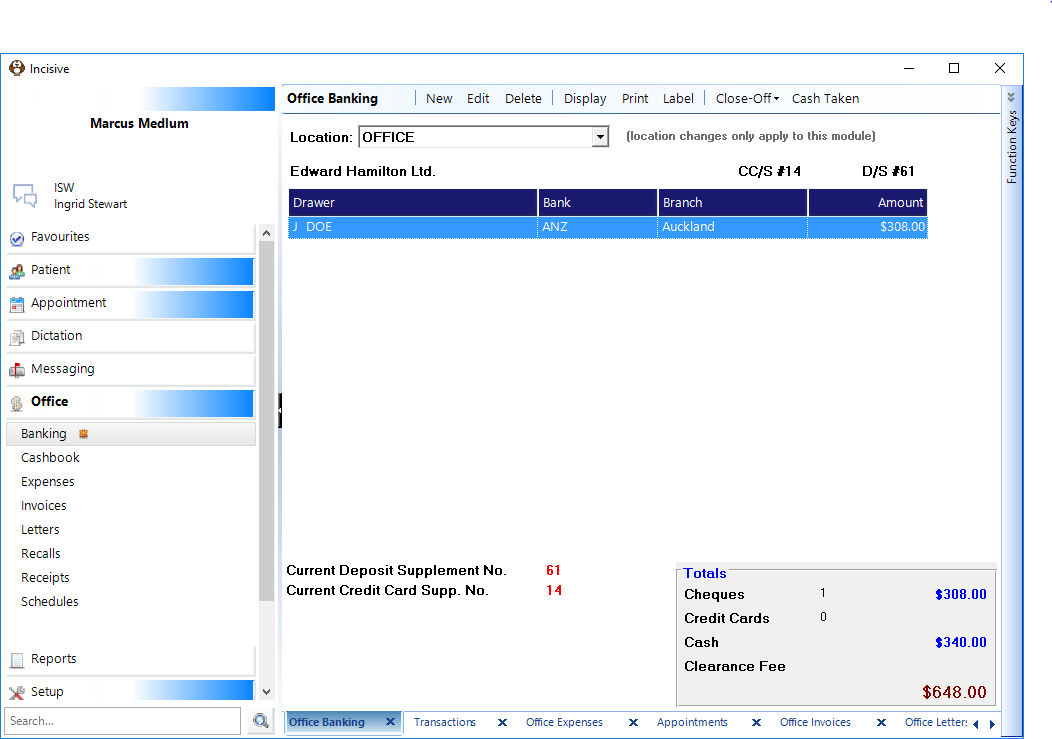
New | Advance to a new Deposit and Credit Card Supplement. |
Edit | Edit details on current Deposit Supplement that has not been closed off. |
Delete | Delete details on current Deposit Supplement that has not been closed off. |
Display | Displays old Deposit and Credit Card Supplements. |
Select Print to close-off the current banking slip and advance to a new one. | |
Label | Print labels as required. |
Close-Off | Close off Cash/Cheques, Eftpos and Amex cards and begin new banking supplement. |
Cash Taken | Record the amount of cash taken out of the current banking. |
Related:
- NEW DEPOSIT SUPPLEMENT
- TO ADVANCE TO A NEW SUPPLEMENT
- TO CANCEL AN ADVANCEMENT TO A NEW DEPOSIT SUPPLEMENT
- TO EDIT DETAILS OF ITEMS ON THE CURRENT DEPOSIT SUPPLEMENT
- TO DELETE ITEMS OFF THE DEPOSIT SUPPLEMENT
- TO PRINT A DEPOSIT SUPPLEMENT
- REPRINT PREVIOUSLY PRINTED EFTPOS SUPPLEMENT
- SETTLE EFTPOS
- CASH TAKEN
- PETTY CASH
- TROUBLESHOOTING
Training:
- Overview
- Close-Off the Banking
- Settling the EFTPOS
- Cash Taken
- Petty Cash
- Bank Accounts
- Advanced.
- Troubleshooting
- Reprint a previously printed EFTPOS supplement