Third Parties can be invoiced either on a patient by patient basis (Third Party Invoice) or bulk billed on a schedule. The Third Party will probably dictate the method. Some may require consultations to be bulk billed, but operations to be invoiced separately.
For a Third Party to be bulk billed, you must first set them up as a Third Party Schedule (see Setup - Contacts - Correspondence - Third Party Schedules).
- After selecting Third Party Schedules from the 'Select Financial Option(s)' screen, a screen similar to the one below will display.
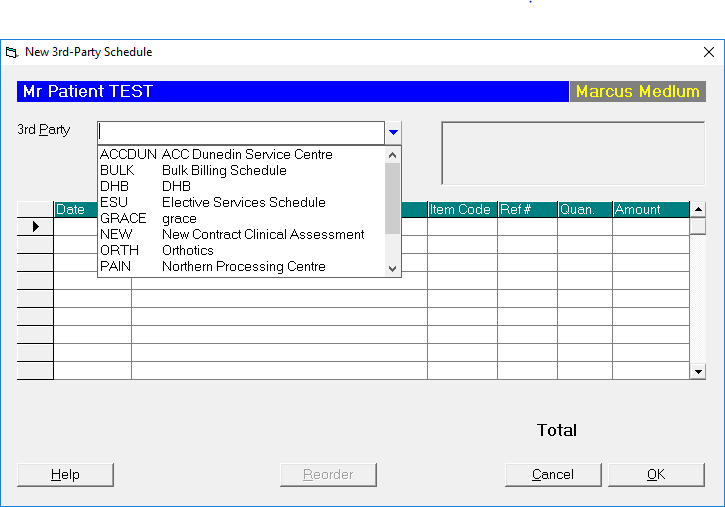
- Select the required Third Party from the list.
The address will display on the right hand side. - Enter the date of treatment.
- Enter the annotation. Use F8 Quick Codes to speed up data entry. The Quick Codes for Third Party Schedules can be separate from ordinary invoice items if required (specify 'Using Schedule Items' when setting up the Third Party).
- If you have selected a Quick Code, the annotation and amount will appear on screen. Otherwise type an amount.
- Add further items as required.
- Select 'OK'.
A Third Party Schedule entry will appear on the patient's financial record as owing, and the entry will appear on the current schedule for the Third party.
To Delete Third Party Schedule Entries
Entries can only be deleted off schedules that have not been advanced. Once schedules have been printed and advanced (the assumption being that it has been sent off for payment), you will need to wait for partial payment of the schedule before reconciling the payment and putting a credit through. You should therefore check your schedule entries thoroughly before processing them.
- Highlight the Third Party Schedule item to delete.
- Select 'Delete'.
- Confirm that you want to delete the entry.
On this page:
Training:
- ACC invoicing
- Add a New Transaction Au
- Add a New Transaction NZ
- Quick Invoicing
- Invoicing the Patient
- Invoice to 3rd Party
- Invoice a Solicitor
- Change Referral for an Invoice
- Make invoice codes from Medicare
- Adding Assistants or Alternate Providers
- Print Balance for Invoice
- Billing Types
- Advanced Invoicing Options
- Hospital Invoicing Au
- Hospital Invoicing NZ
- Tutorial - Invoicing
- GST Rounding adjustment
- Multiple Patients - Group Receipts
- Dishonoured payments
- ACC Payment Advice import
- ACC Payment reversals
- Receipting Payments from Debt Collectors