To speed up data entry, you should set up all the items that you claim for (see Set-up>Claims>ACC), with your own codes.
To claim ACC, the relevant claim details (date of accident, claim number etc) should first be completed.
- Select ACC Schedule from the 'Select Financial Option(s)'.
- You must claim against an ACC Claim number.
If you try to enter an ACC Schedule Entry onto a patient's file without a claim number, a warning message will appear on screen: "No ACC number on this patients file. Please enter the ACC Number"- Select 'Yes' and add a new number; or
- Select 'No' to return to the Financial screen and invoice the patient.
The ACC Schedule Entry Screen will display.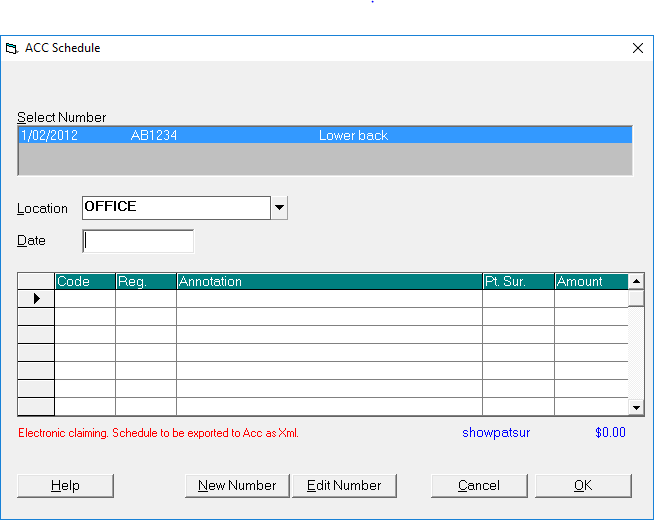
- If there is more than one claim number on the patient's file, select the appropriate claim number for the current visit.
- Enter the date of treatment (or press Enter for today's date).
- In the Code column, type the ACC Quick Code and press Enter or press F8 to select from the full list of available codes.
The Regulation Reference Number, Annotation, Patient Surcharge and Amount will be filled in from the Quick Code. - Type further annotation for the treatment if required, and add further items if necessary.
- Select 'OK'.
If there was an amount entered in the Patient Surcharge column, or if Patient Invoice was ticked on the 'Select Financial Option(s)' screen, you will proceed to the "New Invoice for Patient' Screen. In the case of a Patient Surcharge, the words "ACC Surcharge" will appear automatically in the Annotation field of the patient invoice.
Training:
- ACC invoicing
- Add a New Transaction Au
- Add a New Transaction NZ
- Quick Invoicing
- Invoicing the Patient
- Invoice to 3rd Party
- Invoice a Solicitor
- Change Referral for an Invoice
- Make invoice codes from Medicare
- Adding Assistants or Alternate Providers
- Print Balance for Invoice
- Billing Types
- Advanced Invoicing Options
- Hospital Invoicing Au
- Hospital Invoicing NZ
- Tutorial - Invoicing
- GST Rounding adjustment
- Multiple Patients - Group Receipts
- Dishonoured payments
- ACC Payment Advice import
- ACC Payment reversals
- Receipting Payments from Debt Collectors