The ability to email Prescriptions directly to Pharmacies from SPM has been added as an exemption for COVID-19.
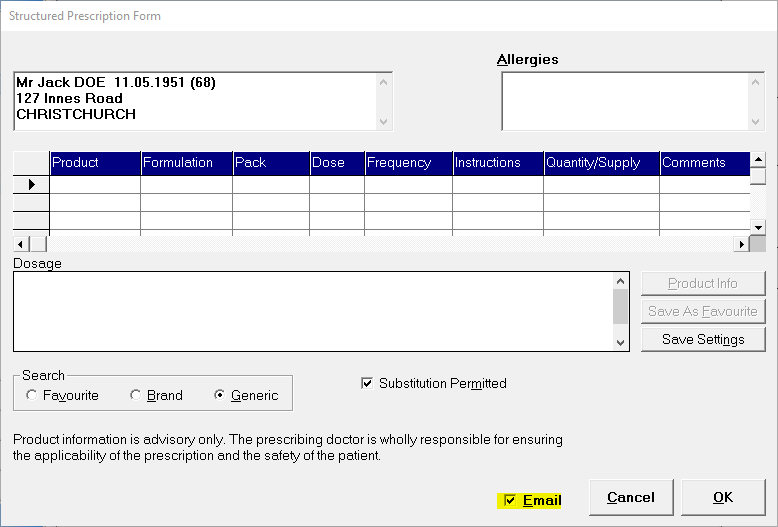
As per creating a normal prescription go to Patient - Notes - Script. Once you have created your prescription select Email and OK. This can be done whether you are using Structured prescriptions (as shown below) or Normal Prescriptions.
You will then be directed to a new screen ' Select Pharmacy'. If you have already added a pharmacy in Patient Registration the pharmacy you have selected with appear at the top of the list.
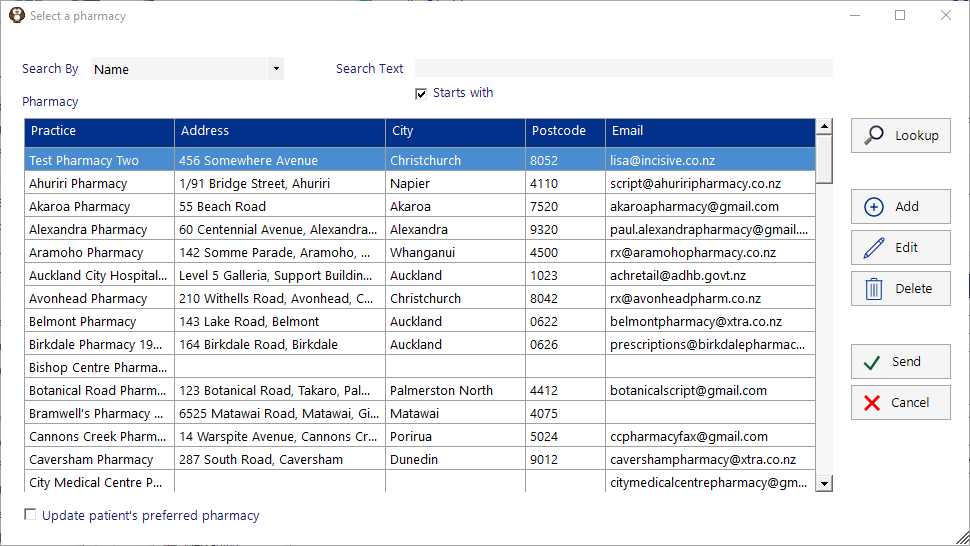
| This allows you to look up any pharmacy that you require. All information should be there but if it is not you may need to contact them direct for the required email address or any other details you need. |
| Manually add a new pharmacy that is not already on the list. |
| Edit a pharmacy to make alterations or additions. |
| Delete a pharmacy from the list |
| When you select send the current prescription you have selected will be send direct to this pharmacy. Please ensure you have the correct pharmacy selected as once this has been sent you cannot stop it. If sent in error you would need to ring the pharmacy direct and let them know. |
| Cancels the email selection process and takes you back to the prescription. |
Update Patients Preferred Pharmacy | If the highlighted pharmacy at the top of list is not the patients preferred pharmacy you can select the correct one from the list or by using the lookup option. By ticking 'the update patients preferred pharmacy' box at the bottom of page will automatically update their pharmacy in Patient Registration. |