Selection of 'Third Party Invoice' displays the 'New Invoice to Third-Party' screen.
- Select the Third Party to bill from the list. If the Billing Type was set to ACC or Third Party in the Details of Referral and a Third Party selected, then the cursor will highlight the appropriate Third Party.
The Third Party address will display on the right.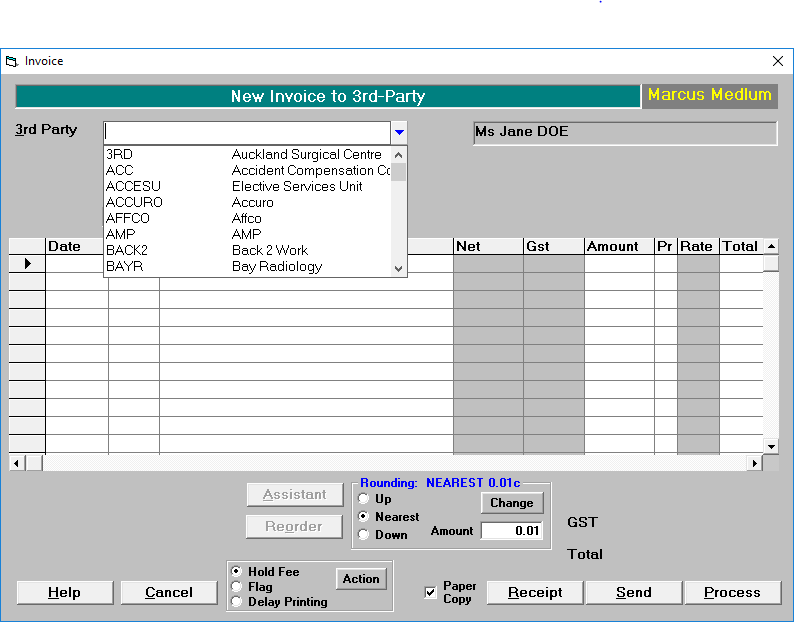
- Type the date of treatment, or press Enter for today's date.
- The annotation field of the Invoice can use either Quick Codes accessed by pressing F8 (see Set-up – Financial - Invoice Items), or free text.
The annotation and the amount will appear on the screen. - Continue adding Invoice Items as required.
The total for the Invoice is displayed just above the icons. A figure for GST may also be included here, depending on whether the User is configured to have fees set exclusive or inclusive of GST. If fees are set inclusive of GST, then a separate amount for GST will not display. - When you have finished adding items to the Invoice select one of the following options:
Hold
This option places the fee on hold so that it can be added to.
Flag
This option allows you to place the invoice in the queue for the next Accounts Run.
Delay Printing
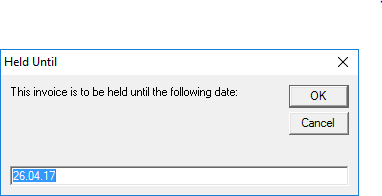
This option allows you to Delay the printing until a specified date. A box will come up asking you what date you would like to delay the printing until.
Receipt
This option allows you to receipt the invoice immediately.
Send
This option allows you send the invoice via email. A message box will prompt you asking you if you wish to do this.
Process
This option allows you to process the invoice. If you remove the tick from the 'Paper Copy' box the invoice will process without printing a paper copy.
On this page:
Training:
- ACC invoicing
- Add a New Transaction Au
- Add a New Transaction NZ
- Quick Invoicing
- Invoicing the Patient
- Invoice to 3rd Party
- Invoice a Solicitor
- Change Referral for an Invoice
- Make invoice codes from Medicare
- Adding Assistants or Alternate Providers
- Print Balance for Invoice
- Billing Types
- Advanced Invoicing Options
- Hospital Invoicing Au
- Hospital Invoicing NZ
- Tutorial - Invoicing
- GST Rounding adjustment
- Multiple Patients - Group Receipts
- Dishonoured payments
- ACC Payment Advice import
- ACC Payment reversals
- Receipting Payments from Debt Collectors