This is valid only if the receptionist records patient movements and is provided for those practices that wish to monitor this information. If the doctor has a computer in the consulting room s/he can see which patients are waiting either in the Appointment Book or by using the Day list selection screen.
A report is available giving the average waiting time, and also the actual time taken (versus booked) for each Appointment Type.
- Select the patient to mark the status of.
- Select the 'Status' button.
The 'Patient Status' screen displays.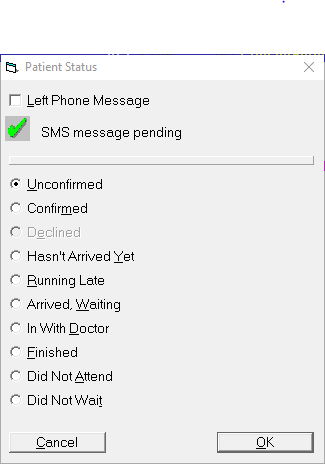
- The radio buttons automatically advance through 'Waiting', 'In' and 'Finished'. If the required button is not activated, select another one.
- Select 'OK'.
NOTE: If you inadvertently mark a patient with the wrong status, select Status again and select 'Hasn't Arrived Yet'. This deletes any previous selections.
Waiting for Doctor
As each patient arrives for their appointment highlight the patient, select status and the radio box will be selected "Waiting for Doctor".
In with Doctor
When the patient goes through to see the Doctor highlight the patient, select status and the radio box will automatically change to "In with Doctor".
Finished
When the patient has finished with the Doctor highlight the patient, select status and the radio box will automatically change to "Finished".
To See the Status of a Patient
On the Appointments tab, press the space bar.