If you have written-off a debt but you are now being paid (partially or fully) for it, you are able to reverse the write-off and reinstate the debt owing to which the payment can be linked to.
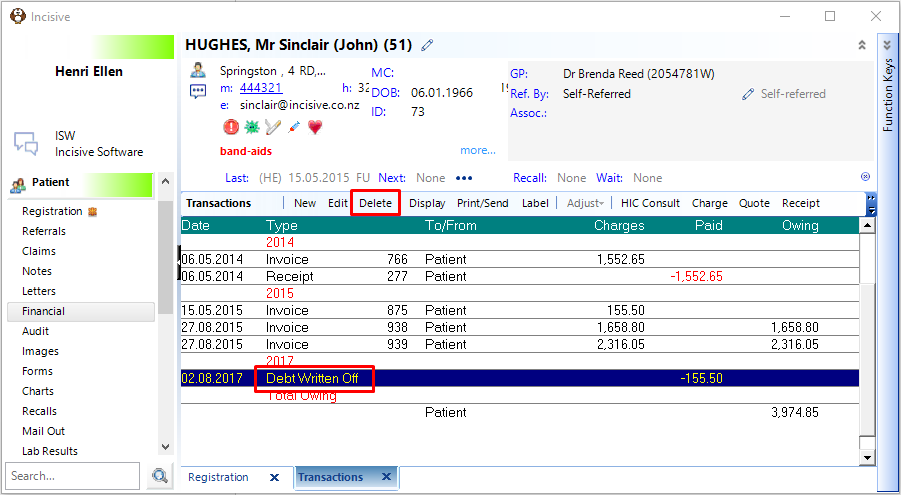
- Highlight the Debt Written Off entry that you want to reverse.
- Select the Delete button
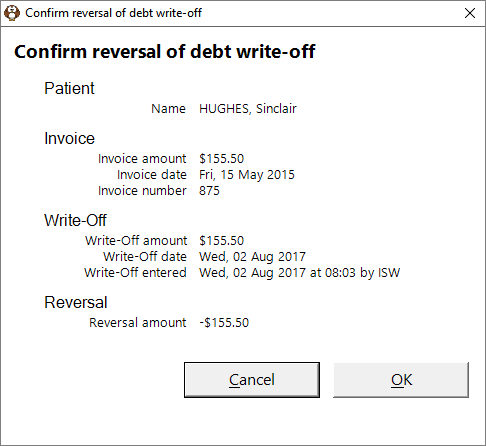
- Check and confirm that you want to proceed with the reversal process.
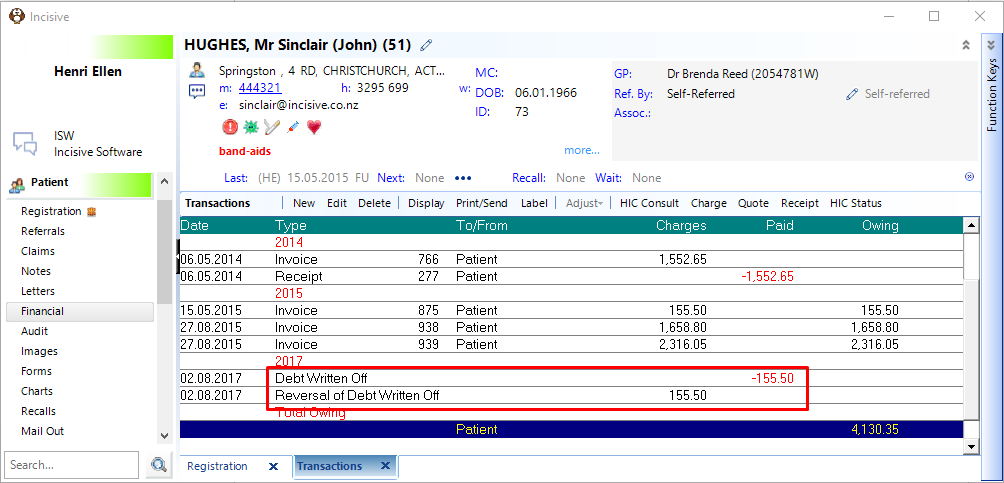
The reversal of the debt write off can only be dated with the date the transaction was entered. You cannot back date these transactions.
Training:
- ACC invoicing
- Add a New Transaction Au
- Add a New Transaction NZ
- Quick Invoicing
- Invoicing the Patient
- Invoice to 3rd Party
- Invoice a Solicitor
- Change Referral for an Invoice
- Make invoice codes from Medicare
- Adding Assistants or Alternate Providers
- Print Balance for Invoice
- Billing Types
- Advanced Invoicing Options
- Hospital Invoicing Au
- Hospital Invoicing NZ
- Tutorial - Invoicing
- GST Rounding adjustment
- Multiple Patients - Group Receipts
- Dishonoured payments
- ACC Payment Advice import
- ACC Payment reversals
- Receipting Payments from Debt Collectors