Each physical or virtual workstation can be configured.
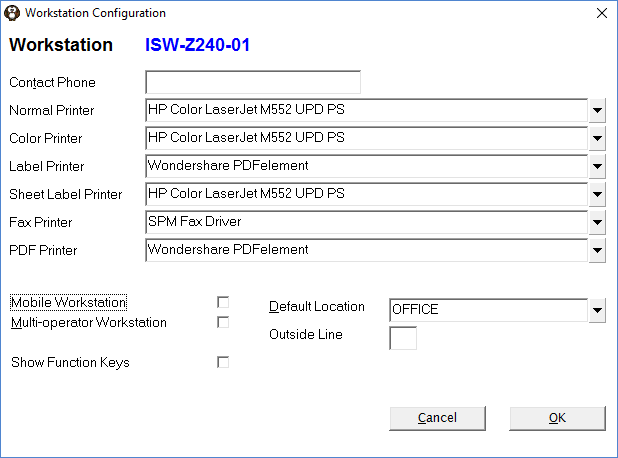
You can configure SPM/PHM to use the printer drivers that are automatically selected for the place you are working at.
When you choose a different Location at the login screen it will prompt asking if you want to use the printers configured for use at the Location. If you elect 'Yes' it will make the changes for you in Setup > Workstation > Configuration.
How To... configure Location Specific Printers
Contact Phone | Used on Error reports. Not mandatory |
Normal Printer | Select the main printer that this workstation will be printing to. |
Color Printer | Select a printer that will be used to print photos from Patient > Images (if different from Normal printer) |
Label Printer | Select the label printer. Only printers that have the option 'Is Label Printer' checked ON in Setup > Printers will appear in this list. |
Sheet Label Printer | Select the printer that will print sheets of labels |
Fax Printer | Choose the default fax driver. This should always be 'SPM Fax Driver' |
PDF Printer | If you have a PDF driver installed (Windows Devices and Printers), then you can select it from the list. This is not generally required now as pdf documents are usually created within the application. |
Mobile Workstation | Check this option ON if you want the list of Locations to appear as a selection list at the initial login form. This allows you to specify a Location for Banking and can also be used to pre-select the printers used at the Location. See LOCATION SPECIFIC PRINTING Locations are configured from Setup > Locations |
Multi-Operator Workstation | Check this option ON if you want the Operators to be prompted for their login and password each time they use the New, Edit or Delete buttons in some of the functions in Patient, Office and Dictation modules. When turned on this option records the Operator ID, Date & Time for every addition, modification and deletion of any financial transaction in Patient. **ISW** Only the following functions are affected by this setting: Office - receipts WP - "charge" aka financial Patient - referrals, notes, letters, recalls, forms, financials, stock used (deletereferral deletenote deleteletter deleterecall deleteform editletter newletter sendfax recalltab formtab stockused.adjust stockused.delete stockused.edit stockused.new editrecall editform newform formF7 letters.sendfax deletefinancial editfinancial newfinancial receipt charge hicconsult) **ISW** |
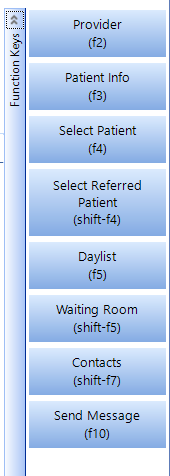
Show Function Keys | Causes the Function Key fly-out panel in Patient module (right-hand side) to be open by default. When unchecked the panel is condensed.
|
Default Location | Select the default Location that you will be using this workstation. It will be the default location when you log in. If the 'Mobile Workstation' option is checked OFF this selection will be the Location used for Banking & Invoicing. If the 'Mobile Workstation' option is checked ON this selection will be the Location used for Banking, Invoicing AND Printer options. Locations are created in SETUP > LOCATIONS. |
Outside Line | Adds a prefix to the number used by the fax modem. Usually 0,1 or 9. Commas can be used to insert a short pause in the dial out process. |

How Do I...
- Label printing - adjusting printing position
- Location Specific Printers
- Troubleshooting Printing Problems
- Using Workstation Profiles