These paths are only required if the function is enabled or if a system-wide setting needs to be changed for this workstation.
If the Terminal Server option is turned ON these paths will be related to the Windows Account login as is regarded as a 'virtual' workstation as the workstation related settings will be used for this login.
The settings are printer selections, display preferences, letter formatting etc.
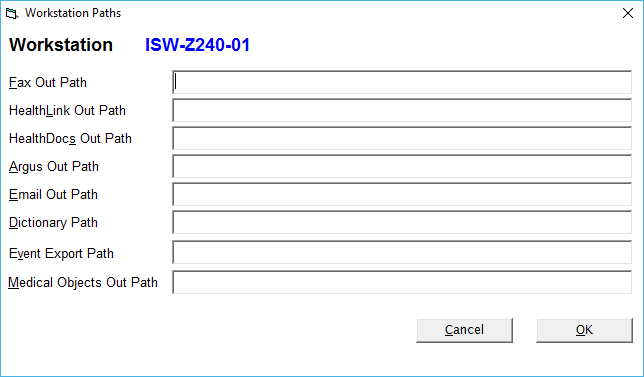
Fax Out Path | As a fax is created it builds a .tif or .fmf file. The file is used when the fax is actually sent. Normally the Fax Out Path would be in a common shared location, however you can allow it to be set to a local directory. The faxing application needs to be able to read and modify rights to the directory. |
HealthLink Out Path | Any entry in this field will over-ride the paths in Setup > System > Message Carriers, for RSD (letters/reports etc.) messages sent out via the Healthlink message carrier. This should only be used if a Provider in a practice is using their own unique installation of Healthlink and the files outgoing correspondence files need to be deposited in a separate directory. The Provider's Healthlink ID will need to be added to Setup > Provider > Config 3 This field is only used when there are multiple Healthlink EDI's used, instead of a single practice/hospital account. There are issues that you need to be aware of when using multiple EDI's. Incoming messages and their acknowledgements are okay however the same Operator processing and sending messages (letters) for different doctors will cause a problem. It is okay if the Operator only sends messages out for ONE Provider. This field is used in conjunction with the Healthlink path fields in Setup > Workstation > Paths |
HealthDocs Out Path | (obsolete) |
Argus Out Path | Any entry in this field will over-ride the paths in Setup > System > Message Carriers, for RSD (letters/reports etc.) messages sent out via the Argus message carrier. |
Email Out Path | (obsolete) |
Dictionary Path | By default, the dictionary file is stored in the program directory. If a shared dictionary is preferred or if you are in a Terminal Server environment, you can enter in a common directory where the dictionary files are located. |
EventExport Path | This path is only required if HL7 files are being automatically created for use in other applications. Detailed information about the EventExport is available from this link |