Breaks are used to block out time during the day so that appointments (or sessions) cannot be booked during the block out period.
The breaks can be within a session, or they can be outside of a session (as long as there is a session on the day).
Breaks may be used to:
- Book a Drug Rep or similar.
- Block out time for a personal appointment, i.e. dentist.
- Hold an appointment slot for a new patient (i.e. you have not yet added them to the database as they are looking around for an earlier appointment).
New Break
- Select 'New' + 'Break'.
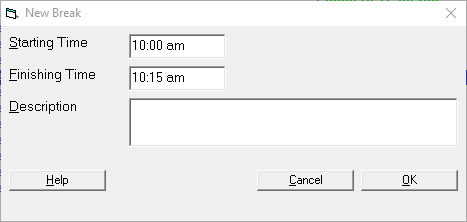
- The Starting Time will default to the time the current time selected. Change this if required.
- The Finishing Time will default to the
- Enter the reason for the break in the Description field.
- Select 'OK'.
- The break will display for the selected time frame.
On This Page:
- New Break
- Appointment Confirmation
- Cancel a Clinic
- Change an Appointment
- Create or Roster a Session
- Delete Appointment
- Deleting multiple sessions
- Find 1st Free Appointment
- Link Session to a Facility
- Make a further appointment
- Make an Appointment
- Notify
- Print a Session
- Print Labels for a Session
- Referral Entry
- Reorder Appointments
- Resources - Configuration
- Resources - Stop double-booking of treatment room
- Search
- Sending an Appointment List
- Setup New Session Type
- Share an Op list with Anaesthetist - using inTOUCH app
- Transfer Appointment to/from Wait-list
- Transfer Session
- Waiting Lists
Training: