ACC Query is used to look at invoices that have been created and:
- are stored in the Incisive database
- are held on the ACC servers
Invoice and Schedule transactions that have been created for a patient are firstly stored in the Incisive database then are uploaded to the ACC portal.
If the ACC portal is not accepting invoice submissions (their web service is not functioning) the invoice will still be created in the Incisive database and will be available for upload at a later time. This is a 'Store & Forward' function.
Local Search
Searches your Incisive database
Left-panel
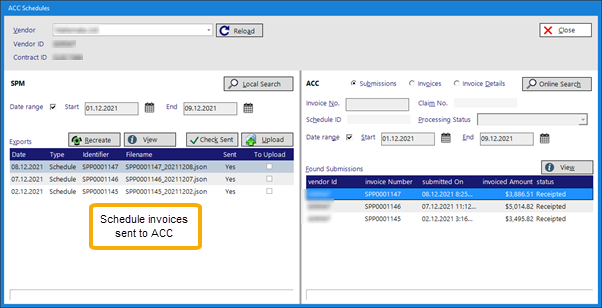
Local Search | Search your Incisive database for invoice transactions | |
Date Range | Apply a date range filter to the search | |
Recreate | Ability to try and recreate the claim and submit | |
View | Look at elements submitted | |
Check Sent | Check has been sent to ACC | |
Upload | Upload to ACC |
ACC Search
Searches the ACC system
Invoice Detail - ACC query
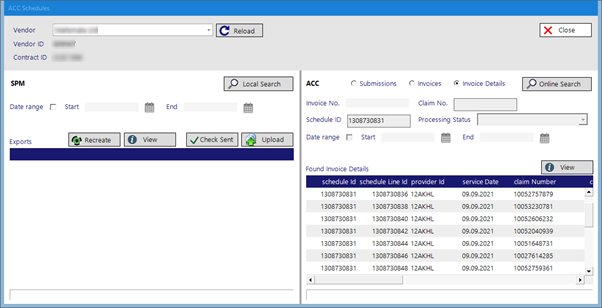
Online Search | ||
Submissions | ||
Invoices | ||
Invoice Details | ||
Date Range | Apply a date range filter to the search | |
Invoice No. | ||
Claim No. | ||
Schedule ID | ||
Processing Status | ||
View |
Payment
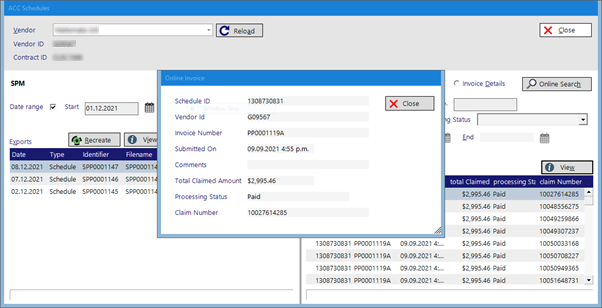
Payment Details
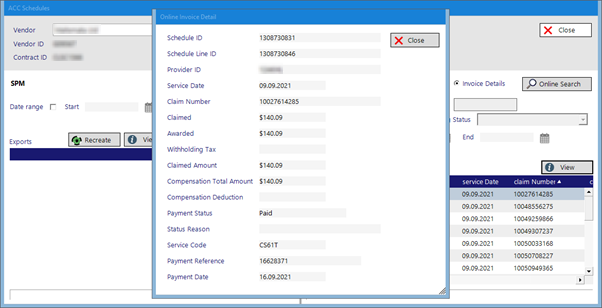
On This Page:
See Also:
- ACC PAYMENTS
- ACC ONLINE (Setup)
- ACC EXPORT LOG
- ACC API RESPONSES
Training:
- ACC Online portal configuration
- Submitting invoices & schedules to ACC portal
- Resending invoices not delivered to ACC
- ACC Non-Core Invoicing
- Delete ACC Invoice after claim has been uploaded