This feature allows you to identify the patients who:
- have been sent an email with an online registration or health questionnaire that includes the tracking option;
- have not yet submitted their online registration or questionnaire form
You need to include the Tracking option ( t=<formuri> ) in the URL and the email needs to be sent from SPM/PHM. When the email is sent the <formuri> text will be transformed to an obfuscated text string and this will remain with the form when it is sent to the patient and when the patient completes and submits the form.
An example is https://forms.incloud.clinic/demo/startup.aspx?r=<referraluri>&t=<formuri>
The Tracking option is always included if the Health Questionnaire option is used when the patient's appointment is made.
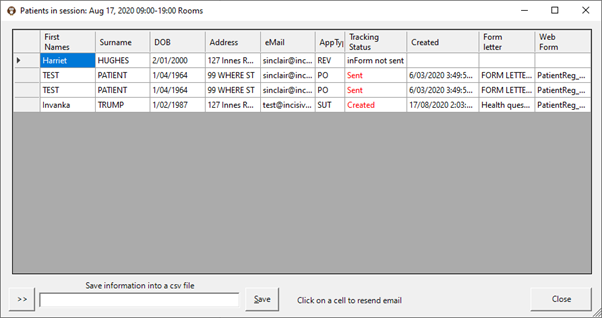
Tracking Status
Status | Description |
|---|---|
Form not Sent | No Form Letter or Health questionnaire sent that includes the Tracking option. |
Sent | Form Letter sent with Tracking option in URL |
Created | Health Questionnaire sent when appointment made (always includes Tracking option) |
Received | Patient's reply has been received but not yet imported. |
Imported | Patient's reply has been imported and will appear in their records |
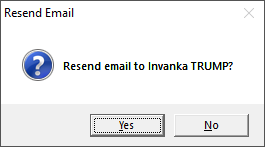
Resend the email
Click on the patient's status and an option will appear to resend the original email.
Export the list
Comma separated file is created with the following fields

On This Page:
Training:
- Appointment Confirmation
- Cancel a Clinic
- Change an Appointment
- Create or Roster a Session
- Delete Appointment
- Deleting multiple sessions
- Find 1st Free Appointment
- Link Session to a Facility
- Make a further appointment
- Make an Appointment
- Notify
- Print a Session
- Print Labels for a Session
- Referral Entry
- Reorder Appointments
- Resources - Configuration
- Resources - Stop double-booking of treatment room
- Search
- Sending an Appointment List
- Setup New Session Type
- Share an Op list with Anaesthetist - using inTOUCH app
- Transfer Appointment to/from Wait-list
- Transfer Session
- Waiting Lists