- Select 'New'.
The 'Select Letter to' screen will display over the top of the word-processing screen.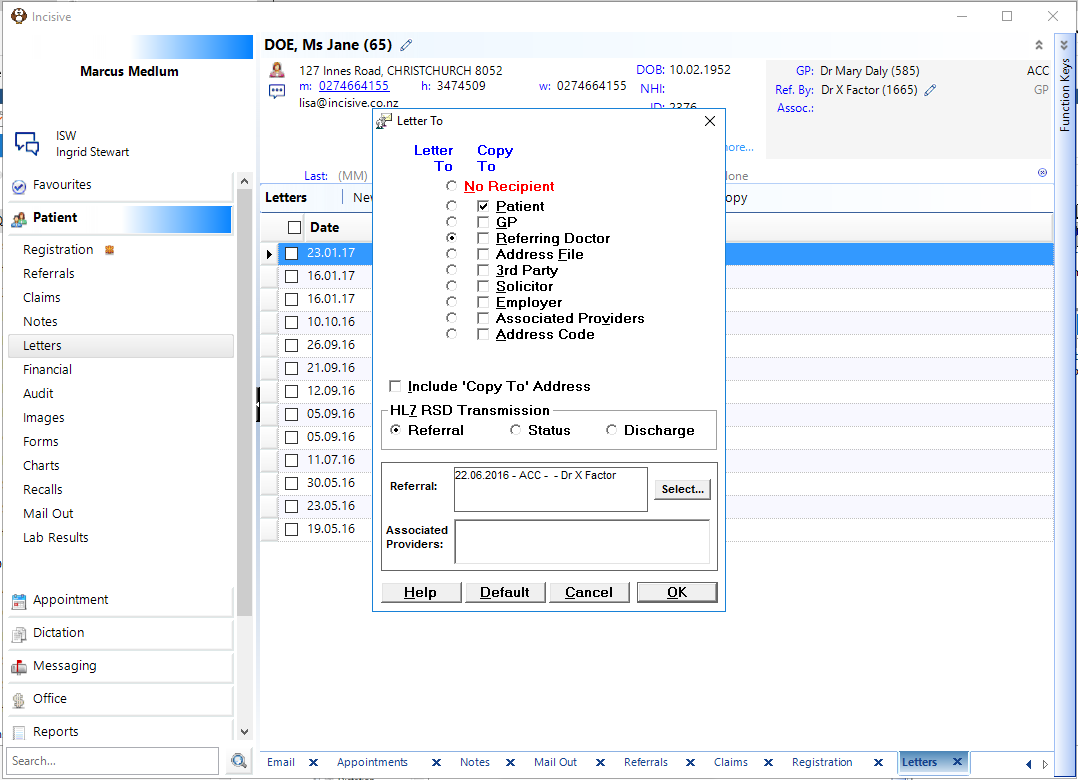
- Select the 'Addressed To' and 'With Copy To' details.
This allows you to select whom the letter is to be addressed to (a single recipient), with the option of multiple copies to other parties. (You can save as the default your most common combination). - Select 'OK'.
The address and salutation of the chosen recipient, details of the patient (as configured in Set-up – Clinical Text – Letters) and "copy to" information appear on the word-processor screen. - Type the text of the letter.
To complete your work more quickly and efficiently, remember to use Quick Codes (F8). These are ideal for any frequently typed text. - When you are happy with the text of the letter and the layout (do a Spell Check and Print Preview if necessary) either:
- Select 'Print' & OK to print and save the letter ; or
- Select 'OK' to save the letter to the patient's file (to edit or print at a later stage).
See Also:
- Special characters for typing