Selecting 'Accounts Run' allows you to print Invoices currently on hold and Statements. This is for all patients. To print a Invoice on hold or a statement for a single patient, you should go to Patient Mode.
- Select Office > Invoices > Statements.
The following screen displays.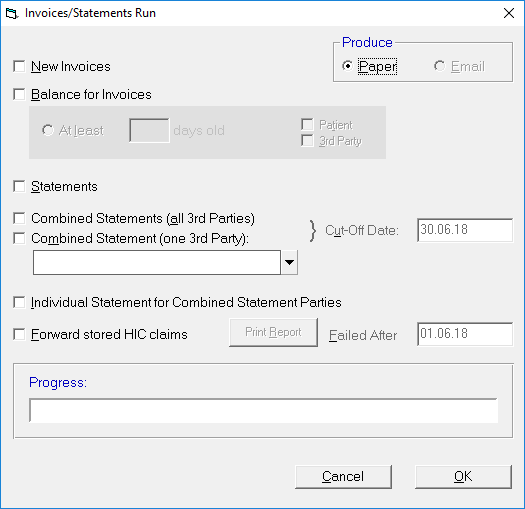
- Select one, all, or any combination of the following:
- New Invoices
- Statements
- All 3rd Party Combined Statements
- Alternatively select to print a combined statement for a single Third Party.
- Select 'OK' to start printing.
New Invoices
New Invoices are created from fees that have been set and flagged or where printing has been delayed until a specified date.
Statements
Statements are printed if a given number of days (see Set-up > Financial > Invoice Options > Patient & Third Party Invoices) have elapsed since the printing of an invoice or statement.
Combined Statements (All Third Parties)
For a Third Party to receive a combined statement, instead of an individual statement for each patient, the Third Party has to be set to Combined Statement (see Set-up > Contacts > Invoicing/Reports). Combined Statements are printed if a given number of days have elapsed since the printing of an invoice or statement.
Combined Statement (one Third Party)
This allows you to produce a Combined Statement for a selected Third Party.
Individual Statements for Combined Statement Parties
If you normally produce a Combined Third Party Statement, you may also want to produce individual statements from time to time.
Forward store HIC claims
Print Report
Failed AFter