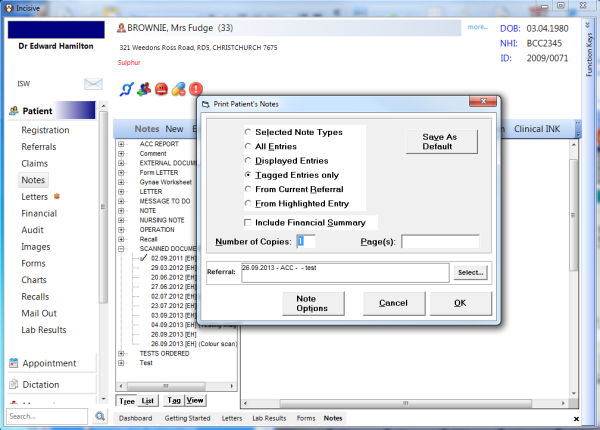
- In Patient mode go to Notes. In the left column highlight the scanned document entry that you want to print from.
- Press the F6 key to 'tag' the entry. This will place two asterisk (**) beside the date.
- Click on the Print button and then enter into the 'Page(s)' field the page number that you want to print.
Note:
- If ten pages were scanned, and you want to print only page seven, enter a 7 into the 'Page(s)' field
- To print a range of pages place a hyphen in between the first and last page number eg. to print pages 5, 6, 7 & 8 enter in 5-8
- To print multiple separate pages place a comma between the page numbers required eg. To print pages 2, 3 & 5 enter in 2,3,5