Cash
Choosing a payment type of Cash results in the amount being written to the current banking deposit supplement. No further details are required.
Cheque
Choosing a payment type of Cheque requires further details to be entered, ie Bank, Branch and From. Whatever you type in the From field on the Cheque Details screen will automatically appear in the From field on the Office Receipt Entry screen and on the Deposit Supplement.
If the payment type is a cheque, the following screen appears.
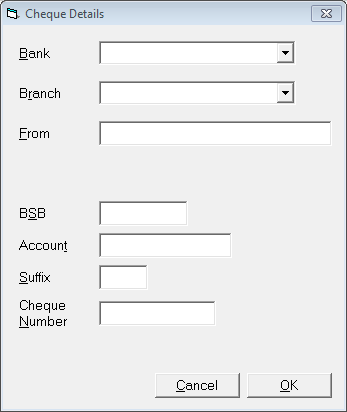
- Select the Bank from the list, adding new banks as necessary.
- Select the Branch from the list, adding new Branches as necessary.
- In the From field, type in the Payee Details.
- Select 'OK' to save the cheque details and return to the Office Receipt Entry screen.
Manual Credit Card
This option is for receipting Credit Card payments using the older style "Zip Zap" system. The chits that this system produces are then banked along with your cheques on the standard banking deposit supplement. This is different from the new EFTPOS terminal where the patient selects Credit Card as their account to debit. These payments must be receipted as a standard EFTPOS payment type.
Direct Credit
Choosing a payment type of Direct Credit requires no more input. The amount will appear in the Cashbook as an item to be reconciled. Direct Credit entries by-pass the banking deposit and EFTPOS supplements.
EFTPOS
Selection of EFTPOS as the payment type writes the amount to the EFTPOS Supplement. No further details are required.
On this page: