Invoice categories serve a number of purposes. Primarily an Invoice Category is a means of grouping together similar types of invoice codes or items, such as consultation codes, operation / procedure codes, materials etc.
Some reports will allow for reporting grouped in this way. In addition to reporting functions, the invoice category will determine whether to apply scaling (the Multiple Procedure Rule or MPR) to second and subsequent invoice items.
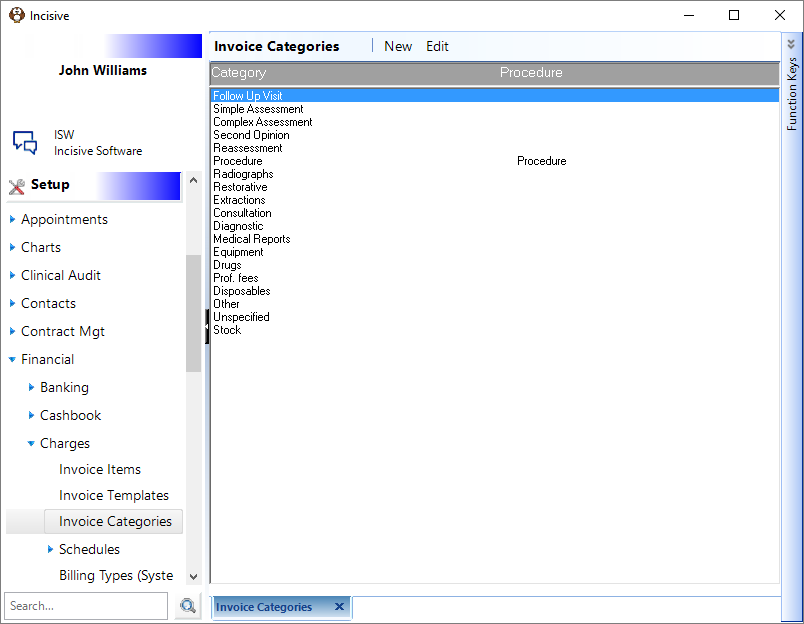
Add a new Invoice Category
- Select 'New'.
- Enter the details as applicable for the Invoice Group being added.
- Select 'OK' to save the new Invoice Code.
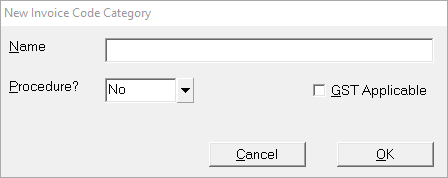
Name | Enter a name that clearly identifies the Category, i.e. Consultations. |
Procedure | Where an Invoice Category is set to Procedure 'Yes' invoice items will be subjected to the 'Multiple Procedure Rule' as defined by the Billing Type. |
GST Applicable | If invoice items in this category are to be GST Applicable tick this option. For example, Medico-legal reports are subject to GST, therefore a category 'Medical Reports' would have this enabled. |
On This Page:
How Do I...
- ACC invoicing
- ACC Online portal configuration
- Submitting invoices & schedules to ACC portal
- Resending invoices not delivered to ACC
- ACC Non-Core Invoicing
- Delete ACC Invoice after claim has been uploaded
- Add a New Transaction Au
- Add a New Transaction NZ
- Quick Invoicing
- Invoicing the Patient
- Invoice to 3rd Party
- Invoice a Solicitor
- Change Referral for an Invoice
- Make invoice codes from Medicare
- Adding Assistants or Alternate Providers
- Print Balance for Invoice
- Billing Types
- Advanced Invoicing Options
- Hospital Invoicing Au
- Hospital Invoicing NZ
- Tutorial - Invoicing
- GST Rounding adjustment