If you are booking into an Operating Session, the screen will have additional fields to complete (optionally).
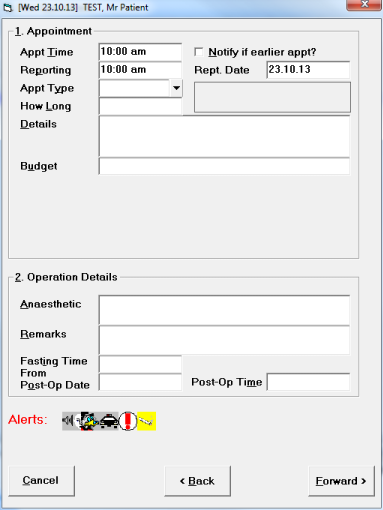
Appt Time | Press 'Enter' to accept the time, or alter if required. |
Notify if earlier appt? | If you want to mark the patient for notification of an earlier appointment, tick the box (or press the Space Bar). If you get a cancellation, you can then search for a patient who you could bring forward to fill the gap. |
Reporting | Press 'Enter' to accept the Reporting Time, or alter if required. A session default reporting time can be set for the session; otherwise the reporting time will default to the appointment time. |
Rept. Date | Press 'Enter' to accept the Reporting Date, or alter if required. |
Appt Type | Select the appropriate appointment type code from the drop down list. For appointment types to appear here, they must first have been validated for the session via Set-up > Appointment Book > Session Types > Valid. |
How Long | Confirm the default appointment length by pressing 'Enter' or type in a different appointment length if required. |
Details | Type in any further details you wish to add. These will be printed on the operation list. |
Budget | Enter one or more Budget codes (see Set-up > Appointment Book > Budget Codes), or ignore if this is not relevant. |
Anaesthetic | Enter Anaesthetic Details if required (or you may choose to use this field for another purpose). |
Remarks | Enter any further remarks. These will print our on the Operation List. |
Fasting Time From | If you need to advise the patient when to fast form, enter the time here and include the merge field 'Fasting time from' in your form letter. This time will then print on the letter. |
Post-Op Date | If you need to advise the patient of a post operative appointment (and you have made this), enter the date here. The merge field 'Post Op date' can be included in your form letter. The date will then print on the letter. |
Post-Op Time | If you need to advise the patient of a post operative appointment (and you have made this), enter the time here. The merge field 'Post Op time' can be included in your form letter. The time of the appointment will then print on the letter. |
Alerts | If any alerts have been previously entered for the patient, these will display. |