As the Message Centre has the most recent versions of these functions, no new development or fixes will occur.
This screen is planned to be deprecated by 2019.
To view Unclaimed Lab Mail go to Messaging -> click on the Utilities module Unclaimed -> Lab Mail button.
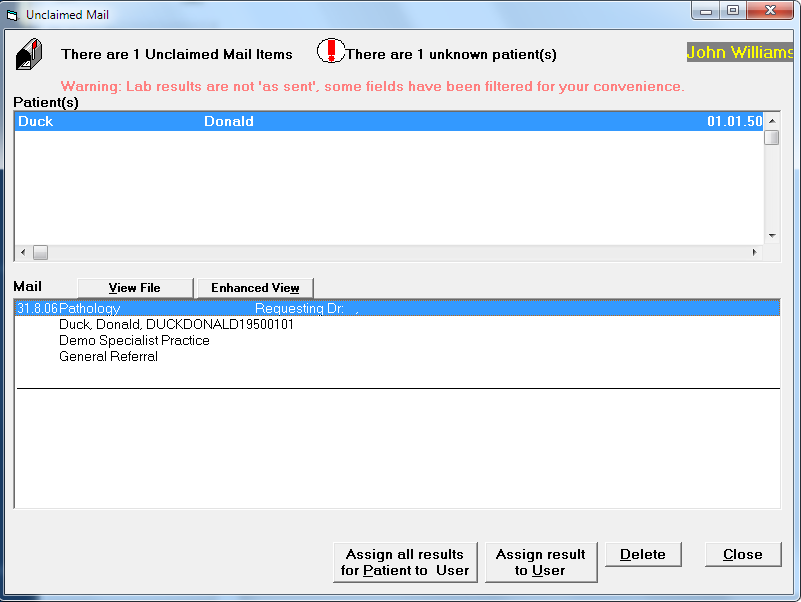
Occasionally you may receive lab results and x-ray reports that have not been correctly "addressed" or should not have been sent to your mailbox in the first place. The Medical Council Registration number or Provider Number is used to match up results and reports being sent with Users on the system. If no Provider number, Medical Council Registration number within the incoming mail matches with any of the doctors in the practice, then the results appear as "Unclaimed Mail Items". These can then be viewed and "Assigned to a User".
To Assign a Lab Result to a User
- Highlight the lab result that you wish to assign.
- Select Assign to User.
- Select the User that you wish to assign the result to. If there is more than one result for the highlighted patient, continue assigning results to the correct User.
- Process the results as described above.
To Delete unwanted results
If you receive results by mistake, ie they are not for a User on your system, then you can delete them.
- Highlight the result to be deleted.
- Select 'Delete'.