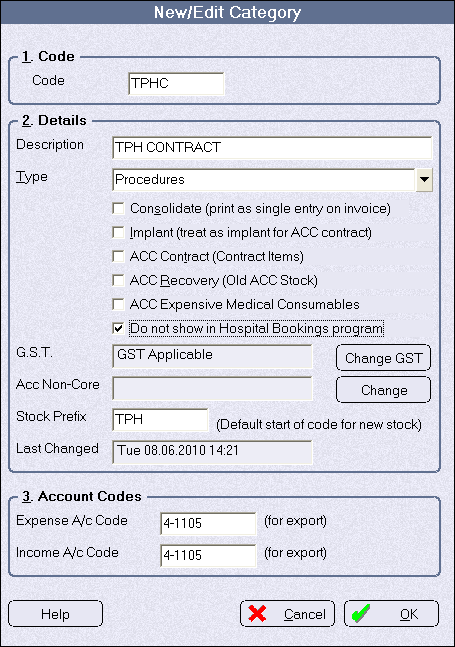
The list of procedures that appear in the Procedure option in Appointments > Hospital Bookings > Operating List and Theatre > Theatre Register are gathered from the Categories in the Inventory module that are marked as being Procedures. 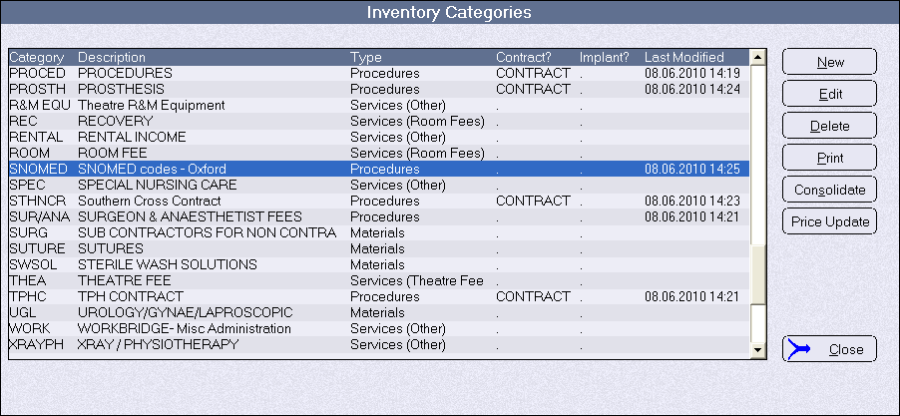
You can restrict the number of procedures displayed by choosing not to show in the Hospital Booking application the procedures from selected Categories. You cannot exclude individual procedures – only all procedures listed in a selected Category.
The reason for excluding some procedures is that the Theatre staff may only want to use a limited set of procedures but for invoicing purposes the admin staff want a larger range of procedures, or across a number of particular code sets for different contracts. The admin staff will choose the appropriate invoicing code to match the procedure code selected by the theatre staff.
To clarify, for a procedure to be displayed in the Hospital Booking application it must:
- be included in an Inventory 'Category' that has a Category Type of 'Procedures'
- not be in an Inventory Category that has the 'Do not show in Hospital Bookings program' selected
To exclude procedures from the list
- In Inventory, go to Setup > Category and select the Category with the procedures that you want to exclude, then choose 'Edit'.
- Check on the option 'Do not show in Hospital Bookings'