A 'Waiting List' a list of patients that you want to keep track of prior to making a booking. For instance, if you are waiting on approval to perform surgery, a patient could be added to a 'Waiting for approval' waiting list.
Patients that are entered onto a waiting list (or transferred to a waiting list from a booking) can be transferred to another Waiting List.
Patients that are on a Waiting List, can be sorted and prioritized,
The current Waiting List display on the Waiting Lists tab.
The 'On-Hold' Waiting List serves a particular purpose. Do not alter this.
To add a new Waiting List
Setup - Appointments - Waiting Lists
- Select 'New'.
- Complete the details applicable to the Waiting List being added.
Select 'OK' to save the new Waiting List entry.
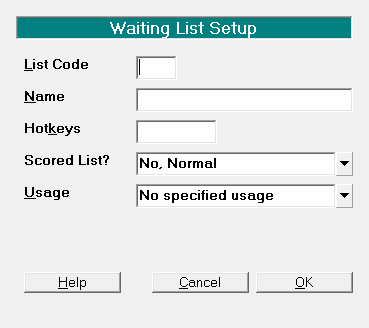
List Code | Enter the List Code | ||||||||
Name | Enter the name to identify the Waiting List, i.e. Waiting for approval | ||||||||
Hot Keys | Enter the hot key to access the Waiting List with in the Appointment Book. The hot key must not be something already in use, or reserved keys such as 'C' for Calendar and 'A' for Appointments. | ||||||||
Scored List | Choose from:
| ||||||||
Usage | Choose from the following:
|
If you add a new Waiting List, you will need to have your System Administrator give permissions to the various roles that require access to this Waiting List.
Changing the name of the Waiting List will also require permissions to be granted.
For some obscure reason the permissions are stored based on the text of the Waiting List Name, rather than either the counter for ApWaitingList or something else that is intelligent!