Sub Contractor Types
Creates categories or types that you can group the sub-contractors by. 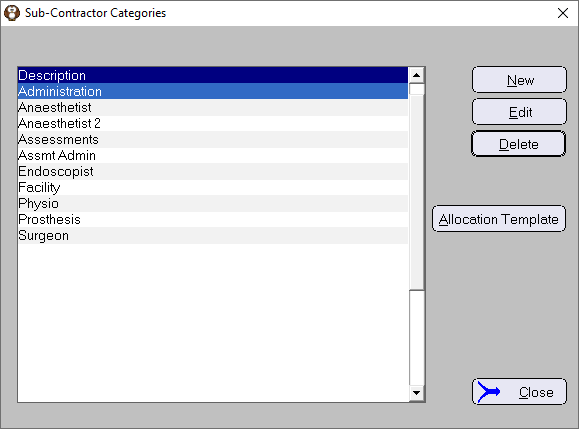
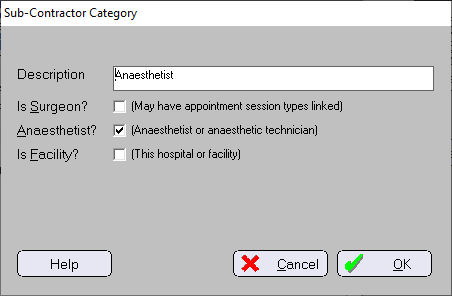
Description | Enter the name for the Sub-Contractor Type category e.g. Surgeon, Anaesthetist, Surgical Assistant, Facility etc. |
Is Surgeon? | Check on if the sub-contractor is a surgeon.
|
Is Anaesthetist? | Check on if the sub-contractor is an anaesthetist. The 'Appointments by Anaesthetist' and 'Operations by Anaesthetist' reports also use this field. Also used for the Anaesthetist field in the HL7 SIU segment. |
Is Facility? | Check on if the sub-contractor is not a person but you do want to use the entity as a service provider so you can allocate funds to them when a payment has been received. |
Allocation Template
Allows a template to be setup and used automatically when a new procedure is entered which is a Fixed Price procedures and requires sub-contractor allocations.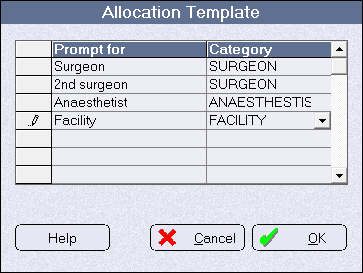
When the 'Contracting' button is selected, when creating or editing a item in Setup > Stock Items (Procedures), the template will be automatically applied (you don't have to manually, repeatedly, enter them in for each new procedure). You can then alter the allocations as required 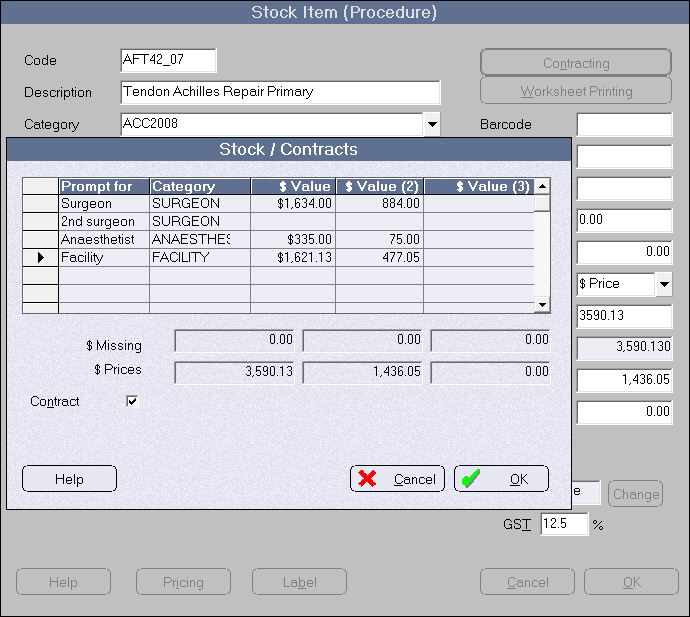
Sub-Contractors
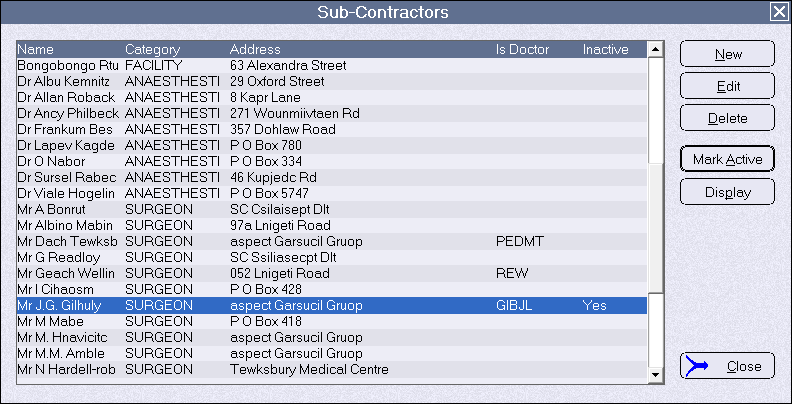
The term 'sub-contractor' is used to broadly include:
- clinicians (surgeons, anaesthetists etc.) or entities who provide their services to the hospital to fulfill a contract arrangement (eg. ACC), or
- surgical assistants providing their services to the primary surgeon, or
- surgeons who have their own operating roster at the hospital and are not contracting to the hospital.
- entities that are not people but are providing services e.g. facilities
For the two initial scenarios, the clinicians provide their services to another party and will receive reward for them. From a financial point-of-view they become a Creditor as you expect to pay them a portion of an invoiced fee
For the last scenario the surgeon is not contracting to any other party. The entry as a sub-contractor is used as a link to their rostered theatre sessions and also for a range of related reports.
New | Create a new sub-contractor or surgeon |
Edit | Edit the details of a sub-contractor/surgeon |
Delete | Delete a sub-contractor/surgeon. Cannot delete the sub-contractor if any accrual items have been allocated to them. |
Mark As Inactive | Keeps the subcontractor in the system for reporting purposes, but allows them to be removed from display or selection lists. |
Display | Display or hide inactive sub-contractors from the list |
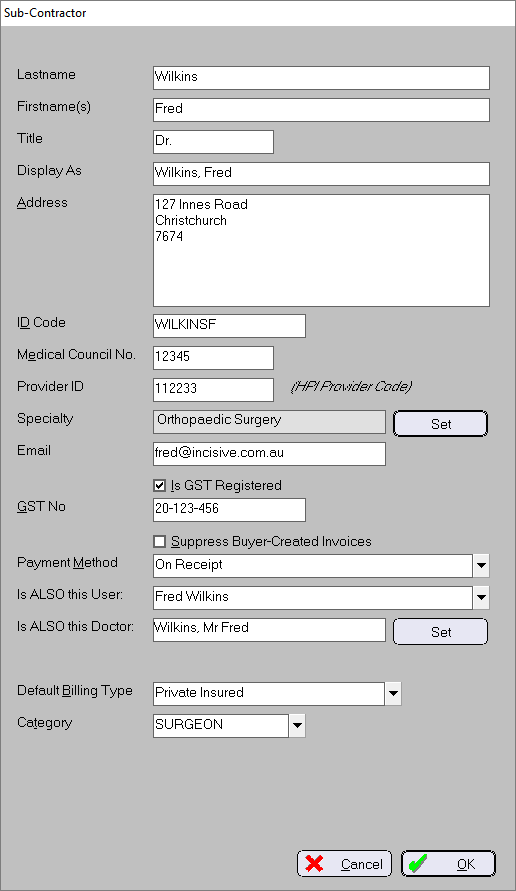
Lastname | Last name or surname of the surgeon/sub-contractor |
Firstname(s) | First name(s) of the surgeon/sub-contractor |
Display As | Usually in reverse format eg, Atkinson, Mr. Denis |
Address | Address for correspondence |
ID Code | Create a code to identify this sub-contractor. |
Med. Council No. | The ID of the sub-contractor's professional governing body e.g. Medical Council or Provider number |
Provider No. | The sub-contractor's ACC HPI Provider number |
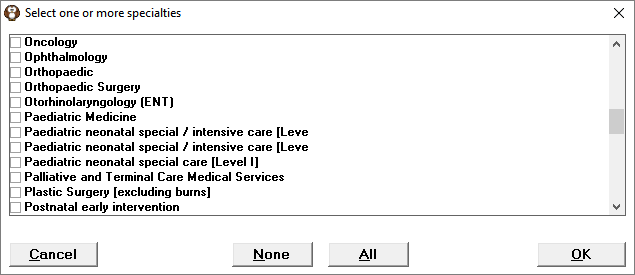
Specialty | Select the surgeon's primary specialty from the list (optional) This list is used by the application for hospitals to group procedures based on the primary specialty of the surgeon. The list can be imported from health-specialty-mar14(filtered).csv Use SPMConfig.exe Data Import > Import Surgeon Specialties (CSV) to import health-specialty-mar14(filtered).csv and populate the list.
|
The surgeon/sub-contractor's email address. | |
Is GST Registered | Check ON if the sub-contractor is registered for GST. Checking this ON will cause sub-contractor allocations to be adjusted, at the time of invoice, to allow for a GST exclusive, rather than inclusive, amount. The subcontractor needs to be properly set up BEFORE invoices are raised. The GST number must be included in the 'GST No.' field. Leaving it OFF will have the allocations calculated on a GST Inclusive basis. |
GST No. | Sub-contractor's GST number |
Suppress Buyer-created Invoices | If there are amounts allocated and payable to this sub-contractor, suppress (do not print) the Buyer-Created Invoices when generating buyer-created invoices for the other sub-contractors. Buyer-created invoices are generated when the Reports > Financial > Accruals > Subcontractor Accruals (Buyer-created invoices) report is run. |
Payment method | In the 'Sub-contractor Accrual reports', how are the Payments Due for this sub-contractor to be shown
|
Is ALSO this User | Select from the list of Users/Providers in the system |
Is ALSO this Doctor | Select the doctor from an entry in Contacts > Correspondence address book. This is used to link through for booking patients into the relevant theatre sessions for this surgeon. Not required if the sub-contractor does not book theatre sessions. |
Default Billing Type | Select the default Billing-Type to be used for the importing theatre sessions (rarely used) |
Category | Select from the list of sub-contractor types e.g. surgeon, anaesthetist |
Add the Invoice Codes
Once the Assistant has been added, go into Setup > Charges > Invoice Items > New. (Ensure that you have the Provider selected that the Assistant is going to be working for).
You will need to create two entries, one for item number 51300 with the dollar value and one for 51303.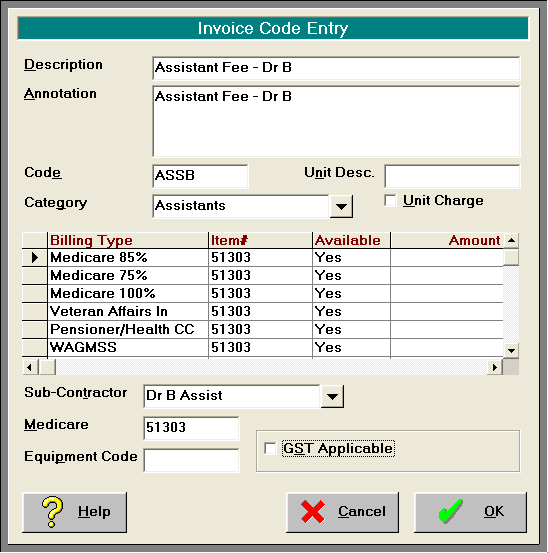
Ensure that each of these new entries in linked back to the relevant sub-contractor or assistant and that there is a link back to the Medicare item number in that field.
On This Page: