The Recall No-show Report is designed to alert you to the patients that have had a recall generated for them, but who do not have a future appointment and/or no new notes or pathology notes have been entered into their record within the number of days specified.
Reports > Patient
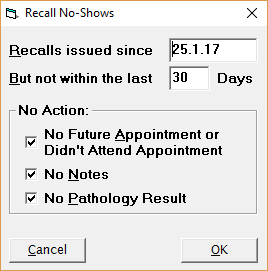
Recalls issued since | Enter a date after which recalls issued are to be reported as a 'no-show'. |
But not within the last x days | Enter the number of days prior to the current date to exclude the recall no-shows from the report. This is to allow the patients time to receive and action the recall, either by making an appointment, having a blood test, or to have been seen. |
No Action: | Select the appropriate options you regard as being a 'No-show'. |
No Future Appointment or Didn't Attend Appointment | If this is ticked and the patient does NOT have an appointment made OR had an appointment from the date in the Recalls Issued Since field, but did not attend and the appointment is marked with the 'Did Not Attand' option, they remain on the list |
No Notes | If this is ticked and the patient does NOT have a new Note, Letter, Operation Note, Medical Report or ACC Report/ARTP entered to their record since the date entered to the Recalls Issued SInce field, they remain on the list |
No Pathology Result | If this is ticked and the patient does NOT have a new Pathology, Histology or X-Ray note entered to their record since the date entered to the Recalls Issued SInce field, they remain on the list |