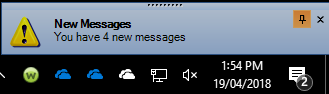
On startup of the application and also when a new Internal message is received, a pop-out notification can appear in the lower right corner of your screen.
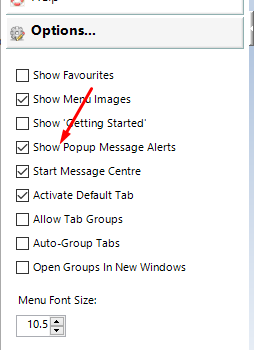
The option to enable/disable this feature is in the Options section of the left-hand menu
When you receive a notification of a recently received message you can use the Quick Reply option to send a reply back to the originator. If you are one of multiple recipients of the original message your reply will only go back to the sender - it will not be broadcast to the other recipients.
Training:
- Assign UNCLAIMED Mail
- Accept LAB Results
- View RSD Documents
- Save EMAIL and Attachments
- Save a Fax to the Patient