The jump function allows you to quickly jump forward or backwards by a given number of days (D/d), weeks (W/w), months (M/m), or years (Y/y) from today, or to a specified date. To jump backwards precede the number with a minus  sign.
sign.
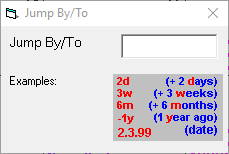
Forward Jump
- Select Jump.
- Type 6w (to jump forwards six weeks from today's date).
- Press Enter.
Backwards Jump
- Select Jump.
- Type -6w (to jump backwards six weeks from today's date).
- Press Enter.
To a Specific Date
- Select Jump.
- Type 30.10 (to jump to the 30th October for the current year, or 30 to jump to the 30th of the current month).
- Press Enter.