An Invoice Template is a selection on Invoice Codes. These would be items that are normally always charged together. In this way, the Invoice template code be used to quickly enter multiple invoice items that are normally charged together.
Add a new Invoice Template
- Select 'New'.
- Enter the details as required.
- Select 'OK' to save the Invoice Template.
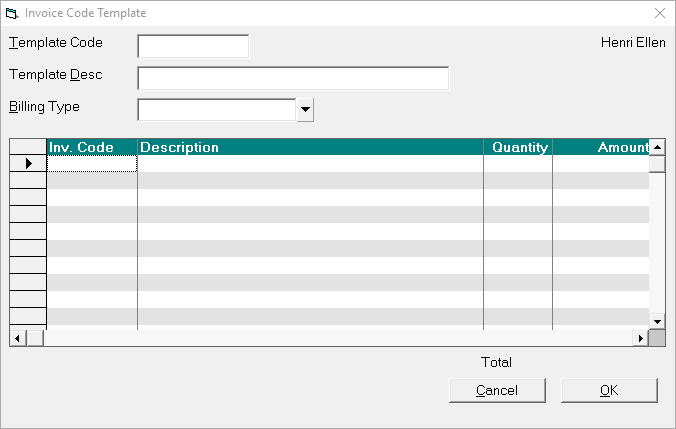
Template Code | Enter a code to identify the template. You will type this to select the Template. |
Template Descr | Enter a description to further identify the template. This will assist with the selection of the correct template. |
Billing Type | Select a Billing Type. The template can be used with other billing types but this is to show the (current) prices. |
Invoice Code | Type in an invoice code and press F8 to select from the list. Add further invoice codes as required. |
The prices in templates automatically update when the prices are updated for the individual Invoice Codes.
On This Page:
How Do I...
- ACC invoicing
- ACC Online portal configuration
- Submitting invoices & schedules to ACC portal
- Resending invoices not delivered to ACC
- ACC Non-Core Invoicing
- Delete ACC Invoice after claim has been uploaded
- Add a New Transaction Au
- Add a New Transaction NZ
- Quick Invoicing
- Invoicing the Patient
- Invoice to 3rd Party
- Invoice a Solicitor
- Change Referral for an Invoice
- Make invoice codes from Medicare
- Adding Assistants or Alternate Providers
- Print Balance for Invoice
- Billing Types
- Advanced Invoicing Options
- Hospital Invoicing Au
- Hospital Invoicing NZ
- Tutorial - Invoicing
- GST Rounding adjustment