This function provides a user interface to the SPM fax server that is running as a Windows service.
It allows you to:
- Reports the status of a fax being sent
- Configuration options for delivery of the fax
- Delivery notification settings
- Diagnostic options for trouble-shooting
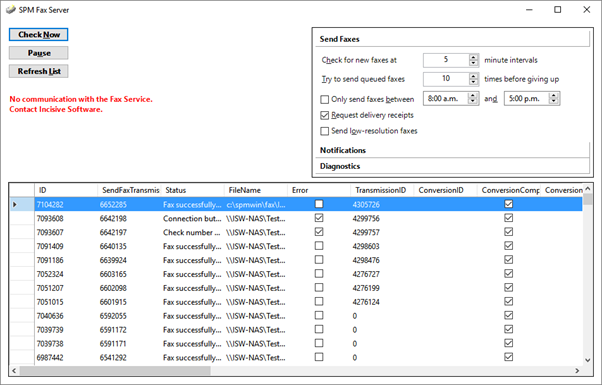
The grid displays the current status of the faxes queued or sent.
If using the GoFax service, the status is retrieved directly from the GoFax server.
Check Now | Force the Fax Service to look for queued faxes |
Pause | Pause the fax service. Click again to un-pause |
Refresh List | Force the console to refresh the contents of the grid. |
Fax Service
The SPM Fax Service must be running on the same workstation/server.

If it is not running or there are incompatible versions of the Fax Service and the Fax Server files, the following message will appear.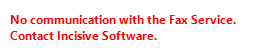
If the No Communication message appears, the faxes will continue to be sent but the settings in the Fax Server Console will not be passed to the Fax Service process
Send Faxes
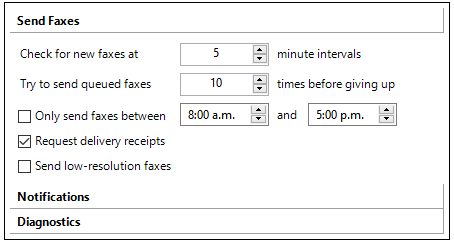
Check for new faxes at | Specifiy the interval that the SPM Fax Service looks to the database to see if any new faxes have been generated and are queued to be sent. |
Try to send queued faxes | Specify the number of attempts to resend a fax. Once the limit has been reached the status is changed to Failed. |
Only send faxes between | Specify the time range to send queued faxes |
Request delivery receipts | The delivery status of each fax will be sent back to the Operator that created the fax |
Send low-resolution faxes | By default, all faxes are sent at the high-resolution setting. GoFax apply an extra 25% to the fee for high resolution faxes. |
**ISW
The settings in Send, Notifications and Diagnostics are stored in the Config table, under the section 'Fax Service - SYSTEM' and so will persist even if the SPM Fax Service is restarted.
ISW**
Notifications
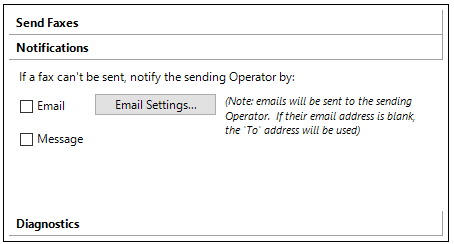
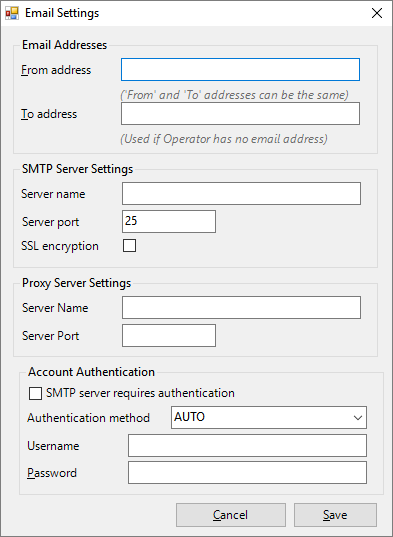
Check ON to send status notifications by email | |
Message | Check ON to send status notification using the internal F10 messaging function |
Diagnostics
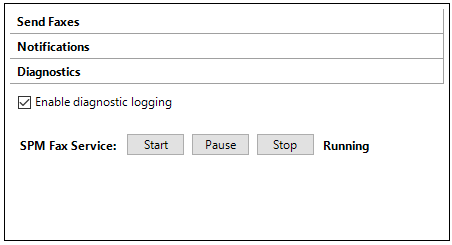
Enable diagnostic logging | A log file is written to the application directory. A separate log file is created each day and is retained for one week. |
SPM Fax Service | Start, stop or pause the fax service. Displays the current status of the fax service. |