F8 Quick Codes
Quick-Codes is a feature used to get and insert information quickly into the current area you are working in.
The Quick-Codes are available in the following parts of the program:
Patient > Notes
Patient > Letters
Patient > Financial > Invoices (all the types)
Appointments
Dictation > Type
The Quick-Codes are created in Setup > Templates and can be inserted by:
pressing the F8 key and selecting from the list
typing in the initial letters of the code then pressing the F8 key to get a filtered list to select from, or
typing in the complete code and pressing the Enter key.
If you are applying formatting to the text in the Quick-Code (bold, italics etc.) make sure that it is only applied to the text and not to the open and close angle brackets or the selection list separators.
e.g. <only the text is bold>
Pick-list Fill-in
To have the form or letter stop and prompt you to select from a pick-list, enclose the choices in <>, separating each option with //. For example if you want to prompt for selection of a hospital, type something similar to this:
Your operation will be carried out at <Southern Cross Hospital//St George's Hospital//St George's Day Surgery>.
Ensure you position and format the text as you wish it to appear in the final printed document.
When you run the form a screen similar to the one below will display. Select the appropriate number for your choice. If you have more than nine choices you will need to use the mouse to select the number you require.
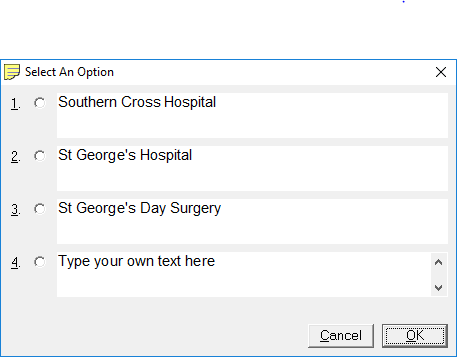
If you have more than one pick list once you have made your selection it will take you to the next pick list.