Function Key F4 brings up the Patient Selection screen.
Pressing F4 in any module brings up the Patient Selection screen and on selecting a Patient will take you to Patient Mode (with the exception of the Appointment Book which keeps you in that mode, as it presumes you want to make an appointment).
If, however, Patient Mode has been left in a state of data entry, pressing F4 from another Mode will return you to the data entry screen as you must complete (or cancel) from the task before continuing to load another patient.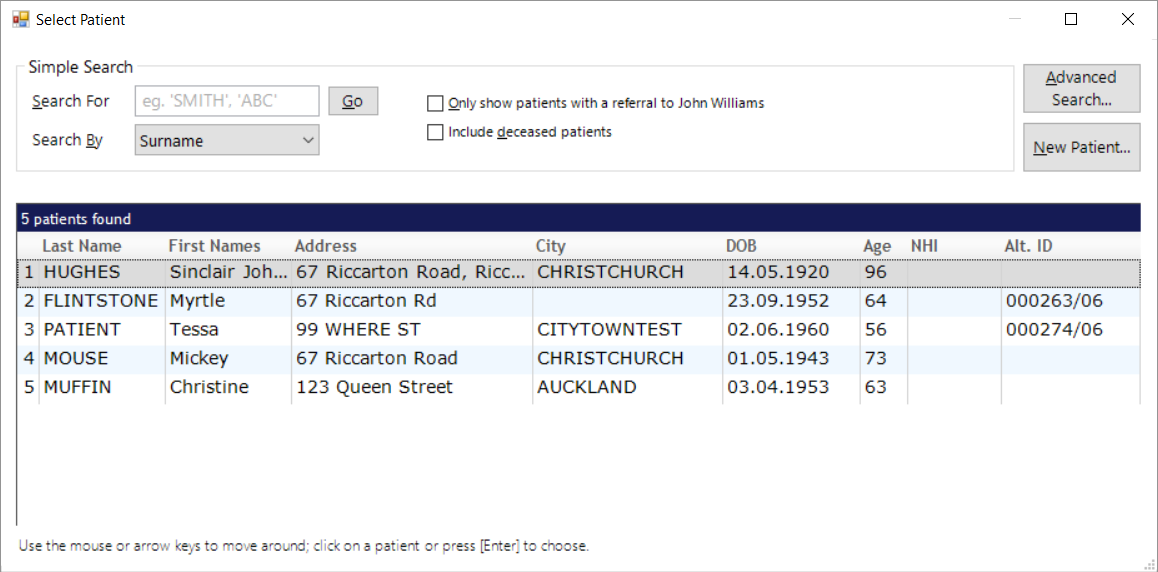
Search For | Start typing in the text that you are searching for |
Search By | Select the field that you are using to search. Any |
Only show patients with Referral | Reduce the list of possible patients that meet your search criteria by only including the patients that were referred to the current Provider. |
Include deceased patients | Include patients that are recorded as Deceased with a 'Date of Death' |
Advanced Search | Advanced search option |
New Patient | Create a new patient record. |
Advanced Search
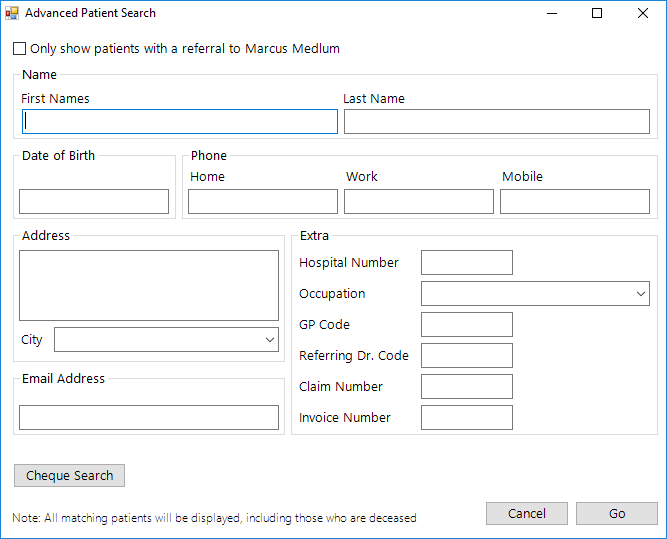
The Advanced Search button allows you to Search for a patient with minimal details. Fill in as much or as little of the fields and list of patients with the appropriate details will appear.