The consolidation of Contacts not only merges two or more contact together, it changes linkages in the database, i.e. the link in the Patient Registration for the GP and / or the link to the Referring Doctor in the Referral. Please exercise extreme care when carrying out this function.
We recommend that permissions to this function only be given to the System Administrator or Practice Manager.
If records need to be merged, staff should request to the System Administrator which records are to be merged.
To Consolidate a Contact
- Filter the list of contacts by entering the name of the Contact in the search field.
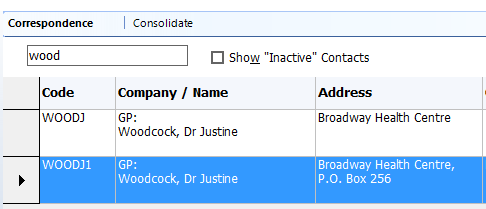
- Highlight the Contact to keep.
- Select 'Consolidate'.
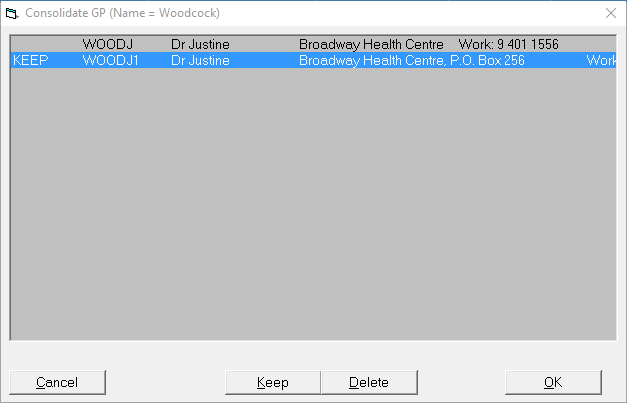
- All entries with a similar name will appear on the list. The entry that was selected on the previous screen is marked to 'KEEP'.
- Highlight the entry to be deleted and select 'Delete'.
- The entry is marked as 'del',
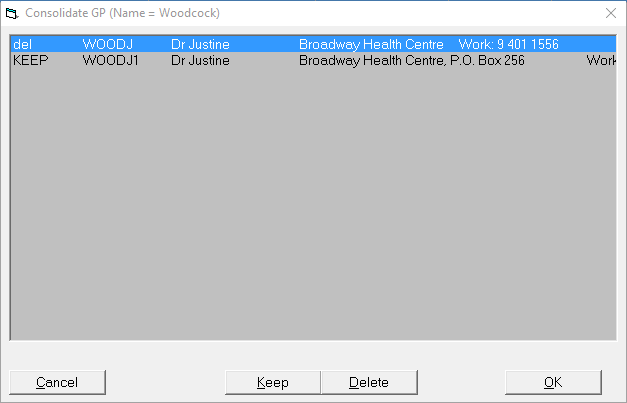
- If there are additional entries to be deleted, repeat steps 5 and 6.
- Select 'OK'.
- A message will appear requiring confirmation that the entries are to be consolidated.
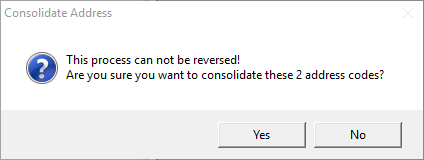
- The process cannot be reversed.
Select 'Yes' only if you are sure the entries can be consolidated.
- A further confirmation is required.
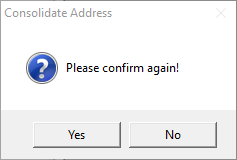
- Select 'Yes' to confirm the consolidation.
- The entry will be deleted from the database and all entries linking to this entry will be updated to point to the entry marked 'KEEP'.
On this page: