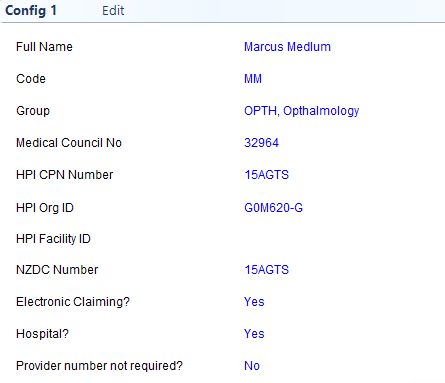
Select Edit
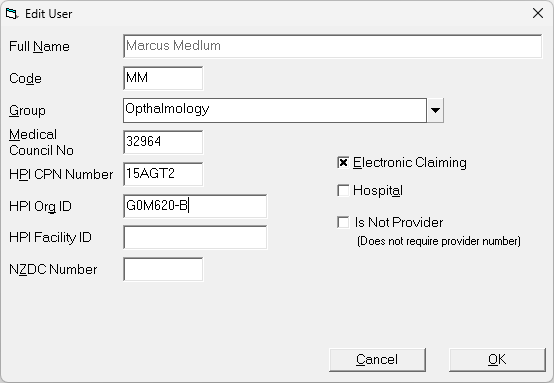
Full Name | This is a display field only and the data cannot be changed due to licencing requirements. |
Code | This can be up to a three letter code for the Provider, normally their initials. |
Group | Select which clinical 'Group' the provider is to belong to. Groups are created in Setup > Personnel > Groups |
Medical Council No | Enter the Medical Council number of the Provider. Used for Prescriptions and also the parsing of HL7 messages, from a joint EDI account, into the Provider's Inbox |
HPI CPN Number | Enter the Health Practitioner Index number for the clinician. The Health Practitioner Index (HPI) is a national database holding information to identify health practitioners. |
HPI Org ID | Enter the Health Provider Identifier (HPI) Organisation number. This is linked to the Provider's business. |
HPI Facility ID | Enter the Health Provider Identifier (HPI) Facility number. This is linked to the location that the Provider's business operates from. |
NZDC Number | If the practitioner is a member of the Dental Council, enter the number here. |
Electronic Maternity Claiming | If the provider is submitting electronic maternity claims, check this option on. |
Hospital | If the Provider is a Hospital check this flag on. If enabled, prescriptions will use the NZMC number of the referrer (Contacts > Correspondence) instead of the Provider NZMC in this section. The inTOUCH & inPATIENT app also uses this to choose to display either today's Admission list or the appointment Sessions for the week. IsHospital will display Admissions. |
Provider number not required / Is Not Provider | If the Provider is not required to have a Provider Number, i.e. it is a business entity or a technician and not a surgeon, check this option on. This suppresses the requirement to have a provider number in order to raise an invoice. |