SMS Messages (Short Message Service) or Text Messages can be sent out of the Incisive application. In order to send SMS Messages, an account needs to be created. Please contact Incisive Software for an account application form. Once completed, we will then configure this for you.
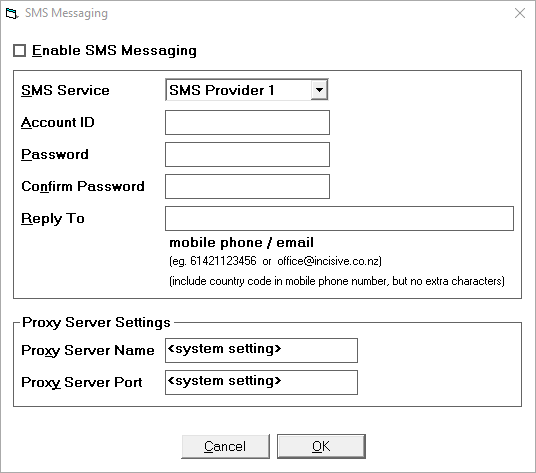
Enable SMS Messaging | This option will be checked on if SMS Messaging has been enabled. | ||||
SMS Service | There are two providers that the Incisive application uses to send messages. | ||||
Account ID | Supplied by Incisive Software / Messaging Provider. | ||||
Password | Supplied by Incisive Software / Messaging Provider. | ||||
Confirm Password | To ensure the password has been correctly entered. | ||||
Reply To | Leave this field blank. | ||||
Proxy Server Settings | Leave blank if not required. If you use a Proxy Server, these details would need to be configured in association with your hardware technician.
|
Related:
- Sending a SMS message
- SMS Scheduled Task configuration
- SMS Setup