Appointment Book Categories allow you to group different Appointment Types together (for reporting purposes).
The Category (Name) can further be classified using a defined set of Classifications.
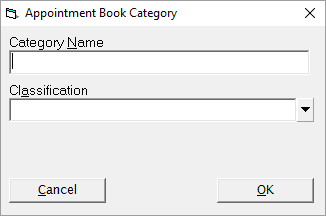
Add a new (Appointment Book) Category
- From the Categories tab select 'New'.
- Enter the Category Name.
- Select the Classification from the drop down list.
- Select 'OK' to save the new category.
Classifications
The classifications are a preset list supplied by Incisive to allow for future KPI reporting. The classifications are as follows:
Classification | Use |
|---|---|
Dressing | For assigning to a Category covering the application or change of dressings. |
Followup Appointment | For assigning to a Category covering subsequent consultations / appointments. |
Initial Consultation | For assigning to a Category covering Initial Consultations (new patient, new problem or existing patient new problem). |
Minor Operation / Rooms | For assigning to a Category covering procedures and minor operations performed at the rooms. |
Operation / Hospital | For any procedures and operations performed in a private hospital. |
Other | For assigning to any Category not covered by any of the other classifications, i.e. Product sales. |
Post Operative Appointment | For assigning to a Category covering all post operative appointments (normal aftercare not invoiced / claimed) . |