If you are an ACC Contract Holder or a surgeon that needs to manage an allotted amount of funds from the Contract Holder, then the Budget Codes (and Contract Management) will allow you to keep track of what procedures are booked in, together with the associated funds associated with those procedures.
You can then run a report to track the monthly figures to see if the budget is likely to be exceeded.
To Add a New Budget Code
- From Budget Codes select 'New'.
- Complete the details.
- Select 'OK' to save the new Budget Code.
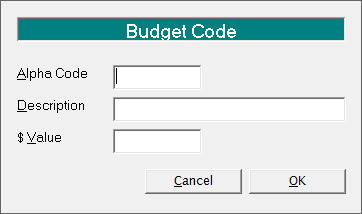
Alpha Code | Enter the Code, i.e. AFT22. |
Description | Enter the description, i.e. Ankle Arthrodesis. |
$ Value | The amount entered will depend on whether you are managing the full amount paid by ACC, or just the amount that you will be paid by the Contact Holder. Enter the appropriate amount that you will receive in total for the procedure. |
To Edit a Budget Code
- Highlight the Code to be changed.
- Select 'Edit'
- Make the required changes.
- Select 'OK'.
To Delete a Budget Code
- Highlight the Code to be changed.
- Select 'Delete'
- Select 'Yes' to confirm that you wish to delete the code.
The code is deleted.
To Set the Budget
- Select 'Set Budget'.
A screen similar to the one below displays.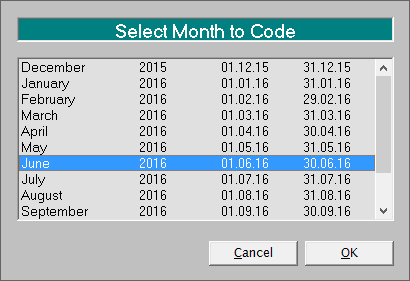
- Select the month you are setting the budget for.
- Select 'OK'.