When performing a stock-take there is often a lot of data to be entered into the system so to help there are some shortcuts you can use.
Switching between Pack & Item
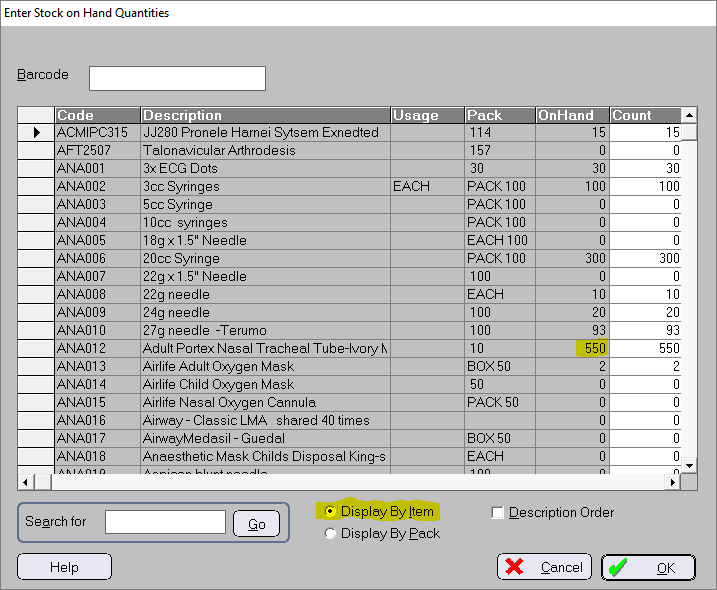
Display by Item
The On Hand and Count columns display the number of Items.
If you enter a value into the Count column you will be entering them as Items.
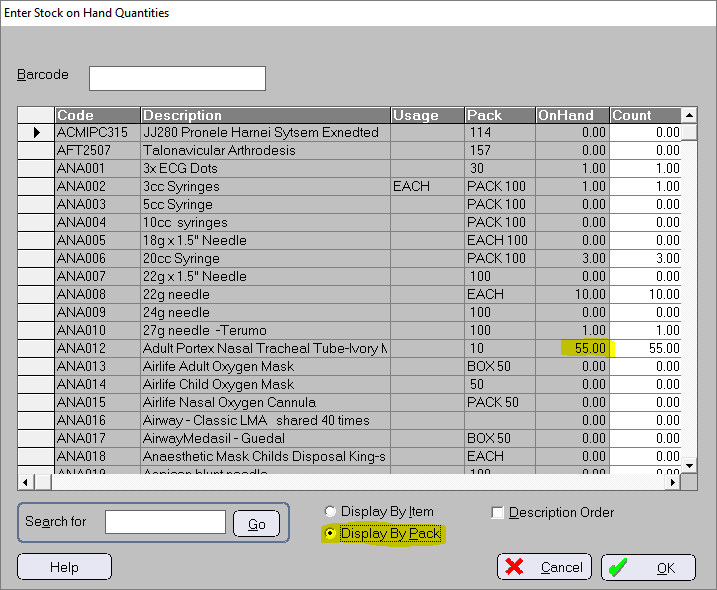
Display by Pack
The On Hand and Count columns display the stock according to the value in the Pack column.
If you enter a value into the Count column you will be adding them as Packs.
Data-entry shortcut
You can enter the count using both the number of whole Packs plus the number of loose Items. This entry format can be used in both the Pack and Item display mode.
Use the letter P or the forward slash / as a delimitor between the two count values e.g. 2P5 or 2/5
In this example below for code ANA012, entering in 2P tells the program that you have 2 Packs which is 20 Items (2 x 10)


In this example for code ANA012, entering in 2P5 (2 whole Packs of 10 plus 5 loose Items) tells the program that you have 25 Items ((2 x 10) + 5)


If you are using the numeric keypad on your keyboard, use the / character instead of P as the delimitor