The primary focus of the Workstation Profiles is to make it very simple or even automatic to switch to different printers when you are based at different computers.
For the majority of users of SPM/PHM, you should never have to select a profile as it will be automatically chosen for you.
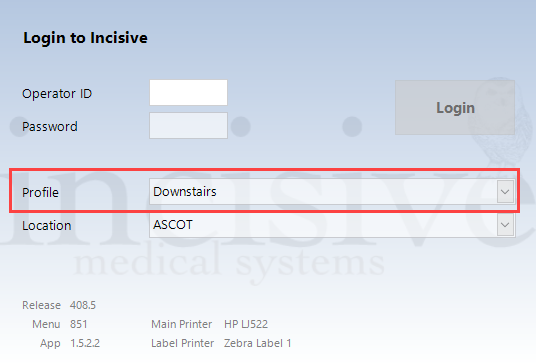
Profile inactive, Location inactive
This is the common scenario where you will use your login at different computers. The correct profile will be selected for the computer you are using.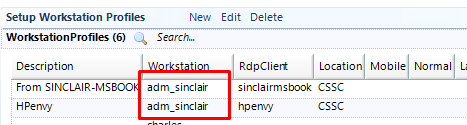
When logging on from the SINCLAIR-MSBOOK laptop
When logging on from HPENVY workstation
Profile active, Location inactive
The only likely scenario for this option is where the same computer (laptop?) is used at different physical locations e.g. a specialist taking their laptop with them.
There are multiple Profiles that have the same Workstation and RDPclient configuration. None of them have the 'Is Mobile' option enabled.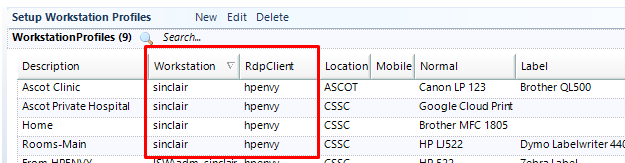
When you select the Profile it will also choose the Location related to it.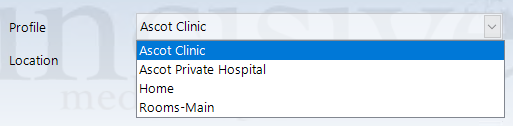

Profile active, Location active
This combination will be rarely used. The scenario might be where a secretary takes a laptop to different clinic locations and wants the invoices and banking to be linked to a different Location.
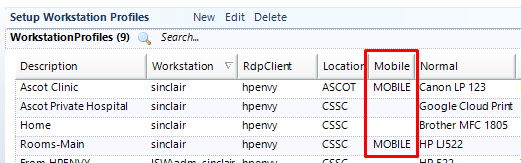
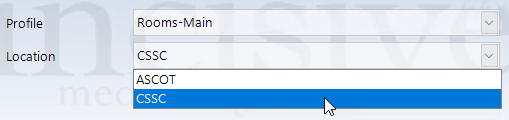
The Location drop-down is only enabled for the Profiles that are configured as 'Mobile'. The other Profiles will use the Location that is linked to it.
Profile inactive, Location active
This combination is unlikely to be used as it would be sensible to have a Profile set to 'Is Mobile' enabled.