For the purpose of banking monies received, the receipted payments can be combined and reported on the basis of:
- Location
- Bank account
Location banking is often based on the location of the clinics that the Provider works from, which allows them to monitor the revenue received for going to remote clinics, but can also be used in a larger practice where you want to separate the receipting performed by reception staff from the receipting from the secretary. You could even use it for the individual banking records for each receptionist, especially if they are responsible for balancing their own cash drawer.
Bank account based banking is usually to distinguish the revenue from different types of services provided. For example, payments for consultations might go into the Providers personal bank account, but revenue from sales of ancillary products could go into a 'shared' Practice account.A 'Deposit Supplement' is just a report which combines the payments combined on either a location or bank account basis.
When a deposit supplement is 'Settled' or 'Advanced' this means that the banking for the location or bank account will be closed-off and reconciled with the actual cash and cheques on-hand, and new payment transactions will be allocated to the next deposit supplement.
'Credit Card' is not EFTPOS – it is the older style of credit card (that doesn't use an electronic terminal) where a separate slip is produced for each transaction and the credit slips are taken to the bank along with the cash and cheques.
Locations
Locations are based on entries made in Setup > Locations.
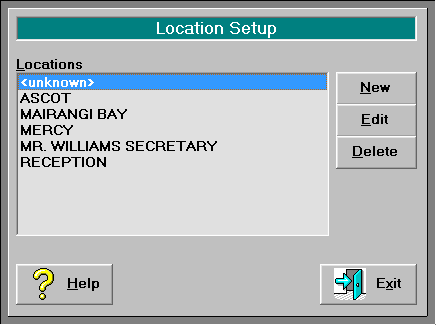
If you have more than one location entered you can set a workstation to always use a specified default location or, if you are using a laptop computer at different locations, or using a Terminal Server connection, you can use an option that allows you to choose your location when you log on.
Default Locations
- At each workstation, go to _Setup Workstation Configuration_ and select the 'Location' to be used for all receipts issued from this workstation. Note that this is not dependant on which Operator has logged in.

- Select OK to save.
- When any Operator logs in at this workstation the 'Location' will now be pre-set with the default you have chosen.
Multiple Locations
- Using the workstation that will be used at the various locations, or on the Terminal Server, go to _Setup Workstation Configuration_ and check on the 'Multiple Locations' option.

- Select OK to save.
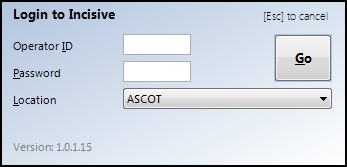
- When any Operator logs in they will be able to select the 'Location' that they are currently at.