Operation pricing
In PHM there are two basic processes used to compile the value of an invoice for an operation.
- Fixed-Price
- Costed-Up
The main difference is where the total of the invoice is either derived from the price of the goods and services provided for the episode of care (costed-up) and the other is when a single fixed value (fixed-price) is charged for the service provided irrespective of the value of the goods and services used and consumed.
Fixed-Price charges are often used for some of the shorter operations, such as grommets or colonoscopies, that do not have a lot of variation of the items used in theatre. As well, many of the larger health service purchasers, such as insurers or ACC, will have a contract purchasing agreement with the hospital for a range of operations to be provided at a fixed cost.
When the hospital decides to provide a fixed-price for an operation it is often for the convenience of the patient so that they have better assurance of the final invoice amount.
When the purchaser requires a fixed-price for an operation it is usually to reduce their risk and to ensure that the hospital provides the service in an efficient manner.
Costed-Up charges have a total on the invoice that is made up of the sale price of each good or service used or consumed during the encounter. This means there is a much better chance of ensuring the patient's stay is profitable.
For both types of invoicing all of the goods and services used for the patient's stay are linked to the patient. This means that even for the Fixed-Price operation you are still able to analyse whether a profit or loss was made on the patient episode of care.
Fixed-Price operations can be either 'all-inclusive' or they may allow some items to be added to the invoice over-and-above the agreed fixed-price. These additional items are usually the likes of prostheses, radiology and orthotics.
Even though the actual invoice may have only the single, fixed-price item on it, to get a true cost of the operation you still need to assign all of the services and materials provided or used to the patient so that you can check that the fixed-price fee you are charging is actually profitable.
Other special invoicing options
- ACC Non-core procedures
Setup
- Billing Type
Set up a Billing Type that reflects the purchasing arrangement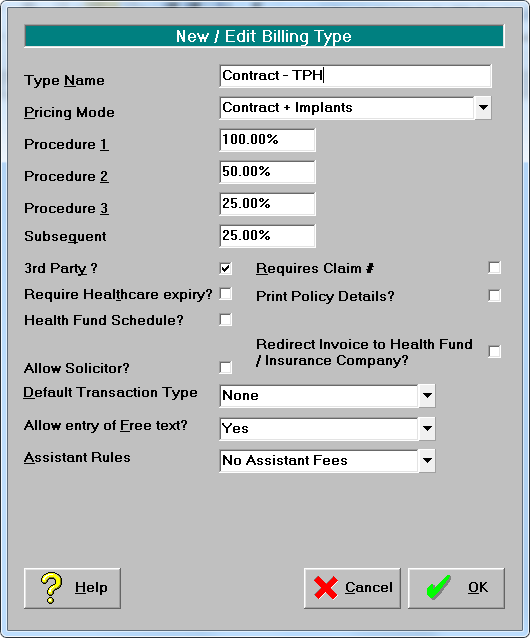
- The most important component of this screen is the Pricing Mode
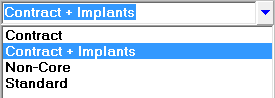
ContractFixed-Price. Only show items marked as 'Contract' onto the invoice (won't include any other stock items)
Contract + Implants Fixed-Price. Only show items marked as 'Contract' or 'Implant' onto the invoice
Standard Costed-Up invoices
Non-Core Special option for ACC non-core operations
- The most important component of this screen is the Pricing Mode
- Operation/Procedure Category
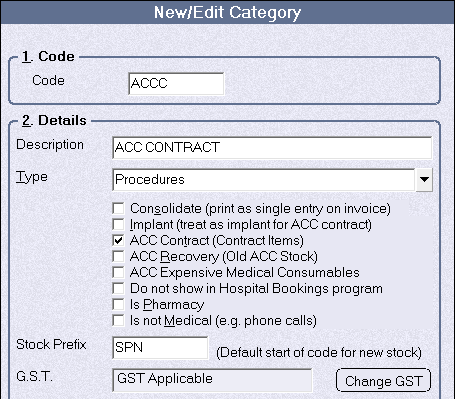
- Create a Category for the operations that will be at a Fixed Price.Setup -> Operations/Procedures -> Categories -> New
- Ensure the 'ACC Contract' option is check ON (even though it may not be for a contract with ACC)This will set the all the items in this category to have the 'Contract' option turned on by default.
- Operation or procedure provided
- Add the fixed price Operation/Procedures Setup -> Operations/Procedure -> Procedure Items -> New
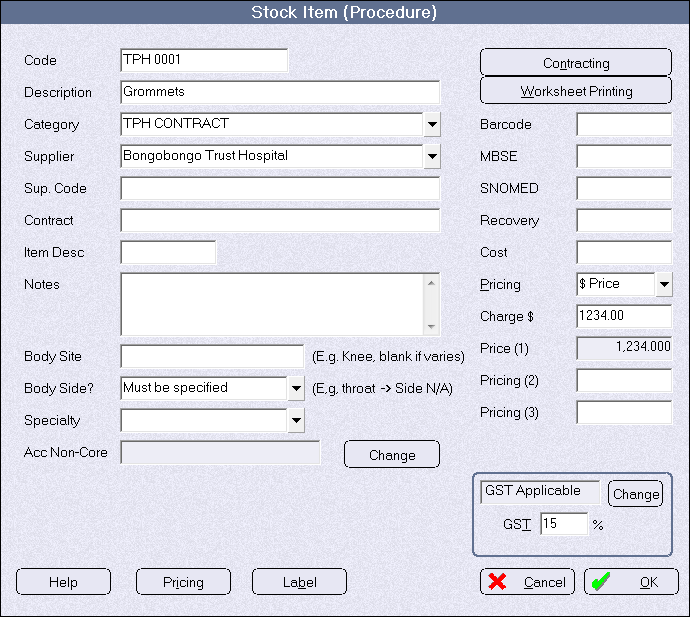
- Enter how the payment is to be allocated when it is received.
- Click on the 'Contracting' button
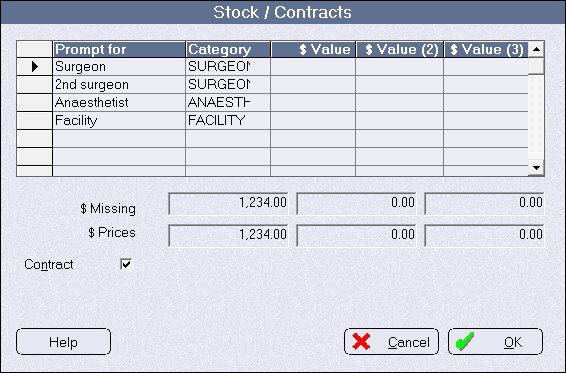
The list in the 'Prompt for' column can be individually entered for this item or you can set up a template of prompts that will be inserted by default when you use this Contracting option.
The template list is set up made in Setup -> Contacts -> Sub-contractors -> Sub-Contract Types -> Allocation Templates.
Commonly used headings are:SurgeonAssistantAnaesthetistRadiologyOrthoticsAdmin feeFacility (hospital) - Ensure the 'Contract' check-box is checked ON

This option must be enabled to allow you to allocate the payment distribution amounts at the same time that you are entering the item into the Stock Used option when creating an invoice. - In the 'Value' column, allocate how the payment for the operation is going to be distributed.
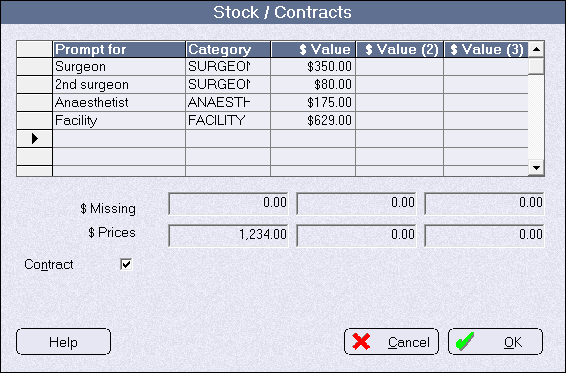
The values in each column MUST total up to equal the 'Price' charged for the item. Alter the Facility value to equalise. If Surgeons & Anaesthetists are providing their services at a known cost then enter them in and distribute the balance of the payment to the Facility (Hospital).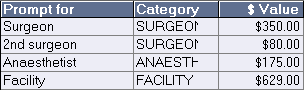
If some of the professional services are provided at a fixed price but others are not known, put a $0.00 value for the unknown service and increase the balance to the facility (you can alter the allocated values at the time of invoicing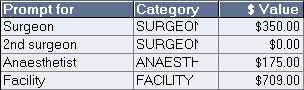
If the cost of the professional services are unknown but the hospital still wants to offer fixed price surgery, allocate the whole payment to the Facility (hospital)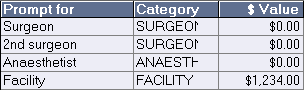
- Click on the 'Contracting' button
- Add the fixed price Operation/Procedures Setup -> Operations/Procedure -> Procedure Items -> New
- Implants or services additional to fixed price
For Fixed-Price invoices, if you are allowed to charge for additional items such as implants or radiology services, the Category for these items needs to be correctly configured.- Go to Setup -> Stock -> Categories -> Edit the relevant category
- Check ON the 'Implant (treat as implant for ACC Contract' option. Use this option even if the category is not actually implants, such as Radiology services, but you still want to include them onto the invoice, as if they were an implant
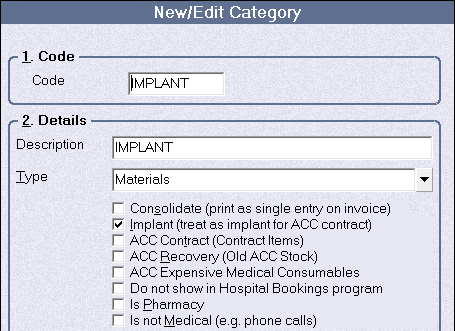
For invoices that are built using the 'Costed-up' method, any items that are used from these Categories will still be listed in the same manner as other items.
- Party of Billing
If the invoice is being sent to a Third Party, setup them up as a new Contact
Setup -> Contacts -> Invoicing/Reports -> New
- Ensure the relevant 'Billing Type' is selected
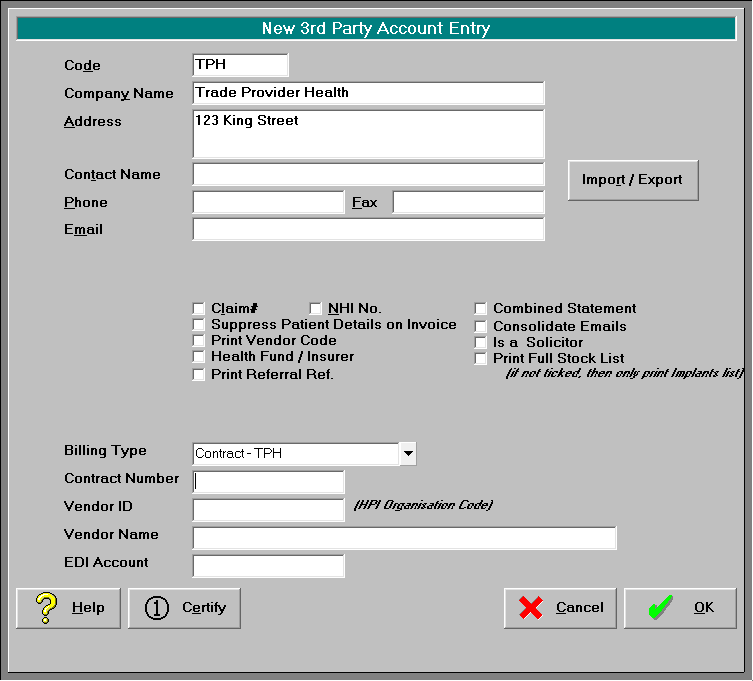
- Ensure the relevant 'Billing Type' is selected