You are able to link an appointment session to a particular facility. This is to enable form letters regarding a patient's admission to be printed directly from the appointment book bringing through the relevant information about the facility (hospital) and the appointment.
We also have the facility to fax operating lists directly from the program to the hospitals. It is therefore important that all relevant information is collected regarding the hospital facilities that are used.
SETUP MODE
- Go to Setup > Contacts > Contact Category
You may already have a category for Hospitals and can edit this entry or create a new entry: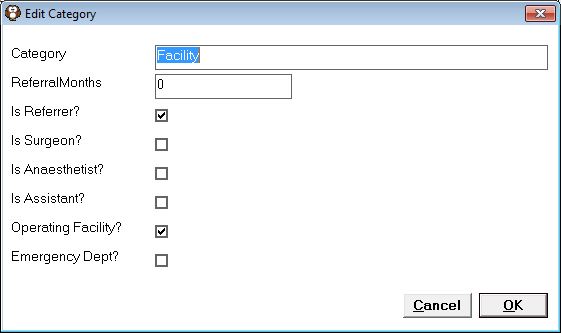
- Put a tick in "Clinic/Operating Facility" and 'OK' to save your changes.
- Then go to Setup > Appointment Book > Session Types and edit your session type to say it is a facility and select the facility as appropriate
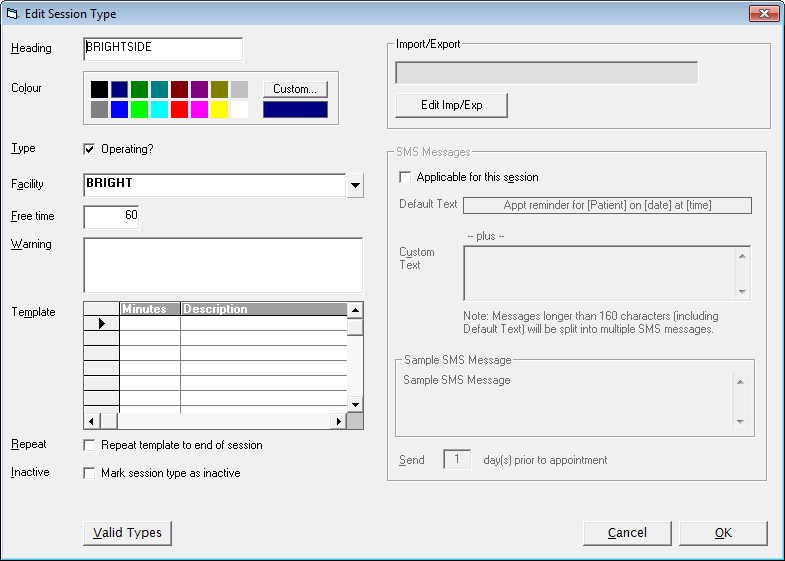
- 'OK' to save your changes.
FORM LETTERS
There are now additional merge codes to use when setting up the admission form letter:
- Anaesthetic Details
- Anaesthetist
- Appointment Date
- Appointment Remarks
- Appointment Time
- Appointment Type
- Appointment Details
- Appointment Facility
- Appointment Length
- Appointment Reporting Date
- Appointment Reporting Time
- Appointment Day/Date Full (e.g. Thursday 30 January 2003)
Create a new or edit your old admission letter using the new merge fields to bring through the information you require.
APPOINTMENT BOOK
- Go to your operating session and highlight the patient, choose Print > Forms > and select the form
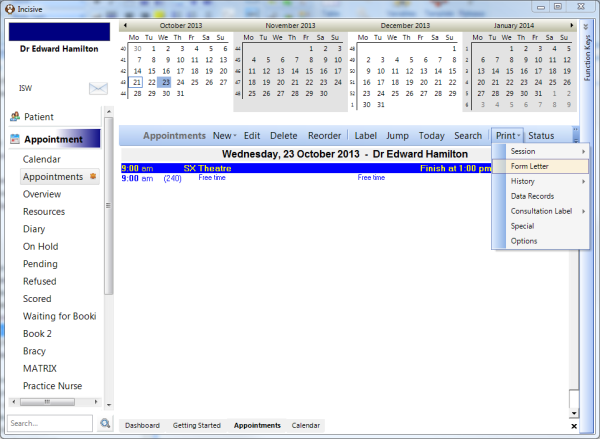
The forms selection is the same function currently available in patient mode.