Some contracts require that certain categories of medical supplies, prostheses or services are to be provided at Cost - that is, there will be no additional margin or markup added to the the cost of purchasing it from the original Supplier.
These contracts are often for fixed price procedures where the fee is to cover all supplies and services incurred by the patient and they usually require the invoice to include a list of the supplies and services.
There are two methods that can be used.
Option 1. - ALL items in a Category are always to be charged at Cost (e.g. a Category called 'Implants - contract')
- Edit each Item in the Category and choose the Price Type of '% Markup'
- Enter a Markup of '0' (zero)
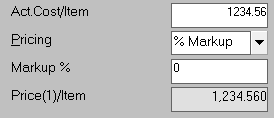
Option 2. - SOME of items will be charged at cost (a contract may specify particular items at Cost) depending on the Billing Type chosen.
- Create a Billing Type that will be used to impose these pricing rules. Make sure that the referrals have the Billing Type selected.
Set the Price Margins for the Billing Type to have a zero margin
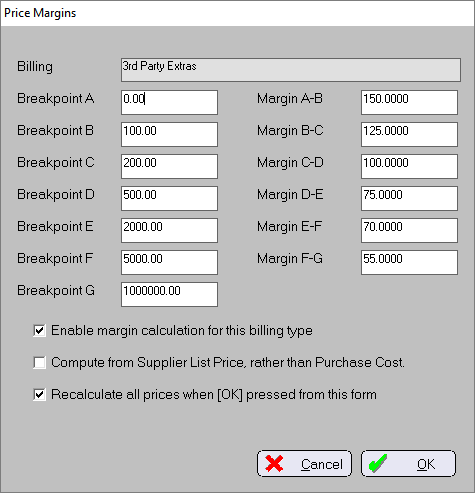
Enable Margin Calculation will turn on the margin calculations for the specified Breakpoints.
Compute from Supplier List will use the values in the Supplier List field rather than the Purchase Cost field, to calculate the Prices based on the Margins.
Recalculate all prices will cause the prices of all stock that uses the Margin pricing options to be recalculated when the OK button is clicked.
If the Price type is set to $Price (meaning you have manually entered the Price), the PRICE will not be automatically updated, even if the Est.Cost/Item is recalculated from the stock arrivals.
Note that with this option turned on, if the COST of an Item decreases it will cause the PRICE to decrease as well.If a Purchaser requires you to charge your stock or services at Cost you can set the Billing Type up so that there is only a single Breakpoint step and the the Margin will be zero.
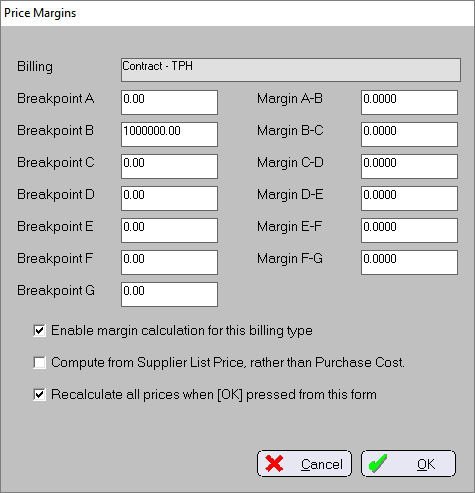
Set the second Breakpoint to a very high value and keep the Margin at zero
Set the Price type for the Items to Margin
If you are changing the Price type from $Priceor %Markup it may have some effect on your pricing margins when invoiced using other Billing Types
This step is optional. You could leave the Price type as $Price it just means that you will need to manually enter the value into the Variable Pricing screen. Using the Pricing type of Margin means that the values to be charged on the invoice will be automatically changed when the Cost of the Item changes.
Use the Variable Pricing option for the Item(s) to be invoiced.

- Enter the Items into the Stock Used function for the patient. Make sure the correct Billing Type is selected.