This option allows a System Administrator to list and manage the Workstation Profiles for all network logins. It has the same functions as if you were creating Workstation Profiles for a single workstation or network login using Setup > Workstation > Profiles.
The Workstation Profile configuration is not linked to the Operator login to SPM/PHM. It relies on the login used to connect to the Remote Desktop or inCLOUD.clinic server and also the name of the local workstation/laptop that you are using.
This view displays a combination of all the workstation profiles that have been added and also all the workstations active on the network.
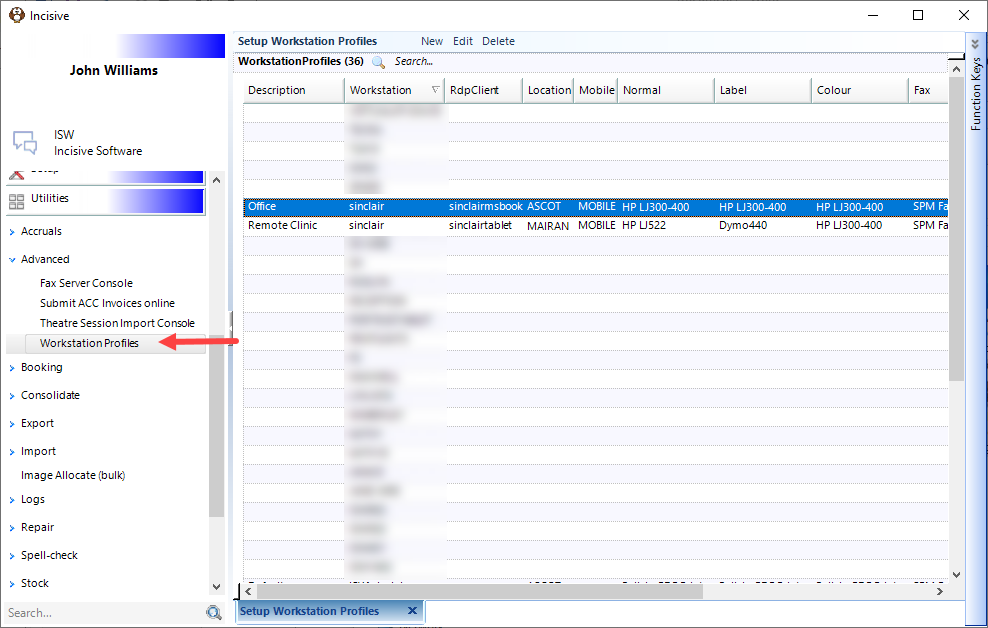
Pre-populate a new Workstation Profile with the settings from an existing profile by highlighting the profile you want to copy and selecting the New button.
New | Manually create a new Workstation Profile |
Edit | Edit an existing Workstation profile |
Delete | Delete a Workstation Profile |
Related pages:
- Creating a Workstation Profile
- Creating Multiple Workstation profiles
How Do I...
- Label printing - adjusting printing position
- Location Specific Printers
- Troubleshooting Printing Problems
- Using Workstation Profiles
- Profile selection at Login
- Creating a Workstation Profile
- Creating Multiple Workstation Profiles