- Select 'New'.
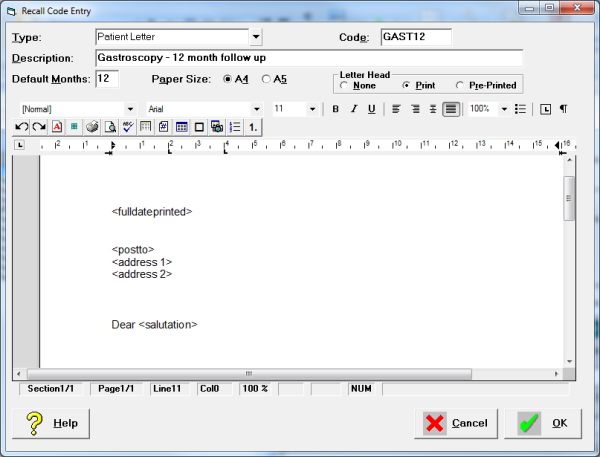
- Select the type of recall that you require for this entry from the list available. Choose from GP Letter, Patient Letter, Referring Doctor Letter, or Telephone Recall.
- Make up an easy 'to' remember Code. The Code is used to select quickly a single recall entry from all available ones, therefore it should be something that is easily remembered and quickly typed, e.g.FU for Follow Up.
- Type a brief description of the recall. The description displays beside the code when entering a recall onto the patient's file. It should be more informative than the code, but not as detailed as the Text.
- Type in the default number of months for the recall.
- In the case of a letter, select the Paper Size.
- If the Type of Recall selected was a letter, type the text of the Recall Letter in the word processor screen.
- Using the Merge Fields (Function Key F9) and text, create a form letter. Your letter may look something like this.
- Select 'OK' to save the entry.