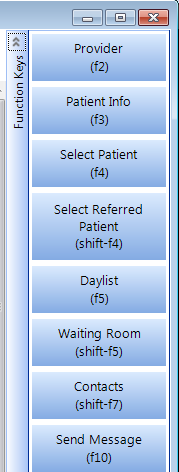
The Function and Shifted Function keys have been programmed to carry out some special tasks quickly. Some of these functions won't be clear until you use the various modes but they are summarised here:
F2 | Change Provider | Allows selection of a different Provider (doctor). |
F3 | Patient Info. | Displays the patient information for the current (or last) patient selected. (Modes other than patient mode) |
F4 | Select Patient | Allows selection of another patient from all available patients |
Shift+F4 | Select Patient for Current User | Allows selection of another patient only from those with a Referral to the Current User |
F5 | Day List | Displays the appointment list for patient selection. (Patient mode) |
Shift+F5 | Check List | Displays the Accounts Check List for patient selection (Patient Mode) |
F6 | Tag | Tag selected items for printing, displaying or attaching to mail |
F7 | Send | Allows you to send a fax, email or secure mail message |
Shift+F7 | Correspondence Contacts | Allows you to view, enter, edit or print a label for someone in your address file |
F8 | Quick Codes | Displays a picklist of codes appropriate to your current data entry field |
F9 | Merge Fields | Displays a list of fields to select from when setting up printing formats. (Set-up mode) |
F10 | Messages Send | Allows you to send an internal message to another operator |
Shift+F10 | Messages View | Allows you to view your messages |
F11 | Confirm | Confirms dictation for processing |
F12 | OK (Save) | Shortcut for OK command button |
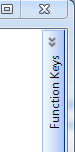
The Function Keys are able to be displayed and selected using the mouse.
In the top right corner of the application and vertical toolbar appears. Click on the chevron symbol to expand or collapse the toolbar.
|
|