Message Carriers
Messaging Carriers are applications that deliver and send messages.
Depending on what Messaging Carriers are in use at your practice will depend on the number of entries listed.

The configuration of the paths should only be done by either someone from Incisive Medical Systems or a suitably qualified hardware technician who is familiar with the Incisive application and the Messaging Carriers.
HealthLink
The HealthLink application is used both in New Zealand and Australia to send and receive messages. The paths will vary between the two countries. The HealthLink system can also handle various message types from PIT, v 2,3 messages (Flat File) and v 2.4 messages (PDF files embedded in an HL7 message), plus HealthDocs. Because of this, two entries will appear in the list, one for the Flat File or FF messages and one for the HL7 messages.
File Format - FF, XML
Healthlink ID
The EDI entered here is supplied by HealthLink. It is the recommendation of Incisive Medical Systems that a Specialist Centre will have a single EDI used by all providers or specialists at the centre (in a single Incisive database). Where individual providers have their own EDI, under no circumstances should that be entered at this level, rather, it is entered in the Provider Settings.
The following paths are the standard paths used by HealthLink and Incisive. A UNC path name may appear in front on the HLINK directory or a drive (mapped or otherwise) may be used. In all instances, the HLINK folder needs to be accessible by any network username that will be sending HealtLlink messages.
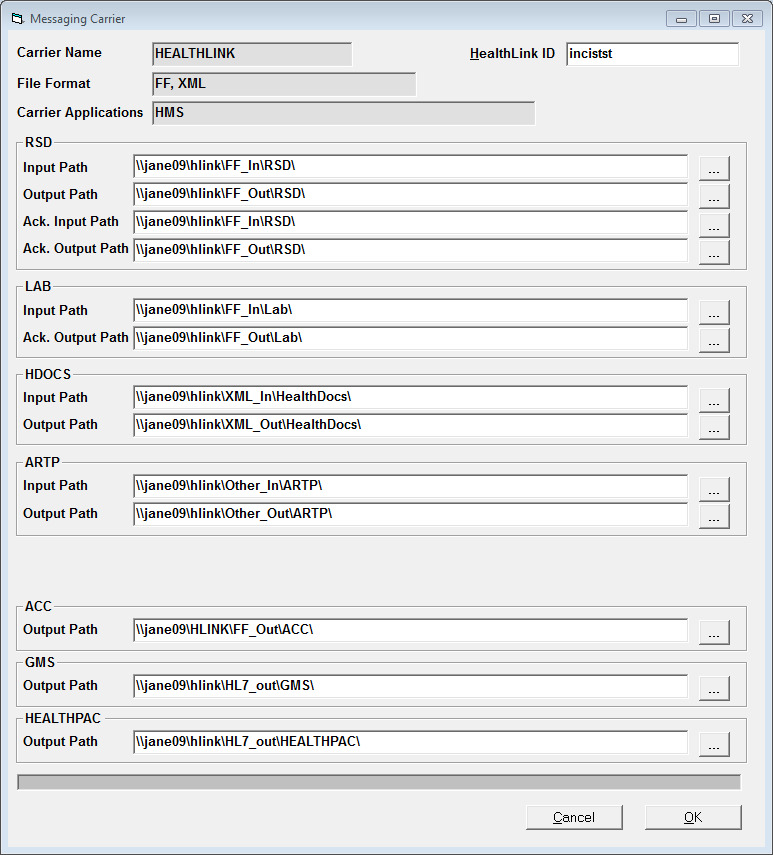
RSD
RSD stands for Referral, Status, Discharge.
Input path | ...\hlink\FF_In\RSD | |
Output path | ...\hlink\FF_Out\RSD |
LAB
Input Path | ...\hlink\FF_In\Lab | |
Ack. Output Path | ...\hlink\FF_Out\Lab |
HDOCS
Input Path | ...\hlink\XML_In\HealthDocs\ | |
Output Path | ...\hlink\XML_Out\HealthDocs\ |
ARTP
This folder is used to send ARTP's between the specialist and hospital (Elective Services Contract holder) where both are using the Incisive application.
The ARTP folder will need to be created in the Healthlink directory structure under both the Other_In and Other_Out folders.
Input Path | ...\hlink\Other_In\ARTP\ | |
Output Path | ...\hlink\Other_Out\ARTP\ |
ACC
Output Path | ...\hlink\FF_Out\ACC\ |
GMS (obsolete)
Output Path | ...\hlink\FF_In\RSD |
HEALTHPAC
This path is used for delivering Maternity Benefit Claims (Section 88) to the Ministry of Health.
Output Path | ...\hlink\FF_In\RSD |
File Format - HL7
The HL7 v 2.4 messages are used to deliver correspondence as a PDF file embedded in an HL7 message.
The files are delivered to the \HL7_in\RSD02NZ folder and picked up from the \HL7_out\RSD02NZ folder.
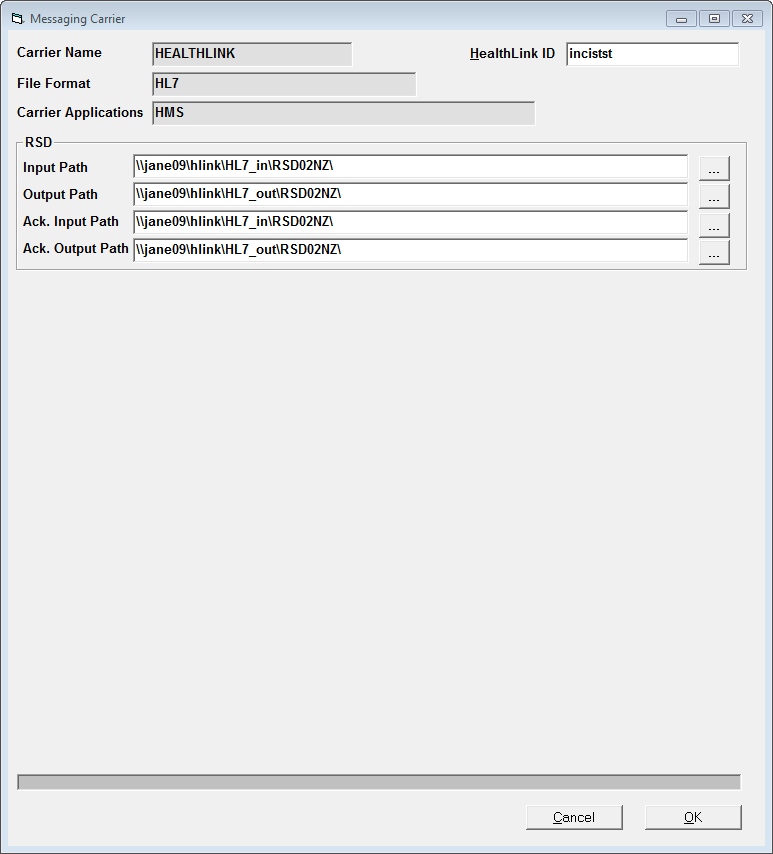
The paths are stored in the SystemMessaging table in the database.
NZ | |
|---|---|
sysm_CarrierName | HEALTHLINK |
sysm_FileFormat | FF,XML |
sysm_CarrierApplications | HMS |
sysm_CarrierName | HEALTHLINK |
sysm_FileFormat | HL7 |
sysm_CarrierApplications | HMS |