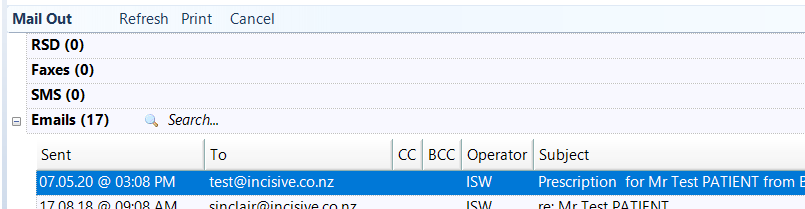
During the COVID notification period, the Director General of Health has permitted emails to be sent directly to pharmacies.
With SPM v409.4 you can now send the email as you complete the script.
You can record the patient's preferred pharmacy and also have the specialist's preferred pharmacy if the medications are available at a local pharmacy.
To assist you to find the pharmacy's contact details we have added the ability to do a online lookup to Healthpoint's National Directory Service which provides a searchable list of pharmacies, which you can then save this information to the patient's record and also your list of Pharmacies in Setup > Contacts.
You need to meet the Ministry of health's requirement to send emails using TLS encryption.
The waiver text that is required to accompany the prescription is already inserted.
Step 1. Enable ePrescriptions
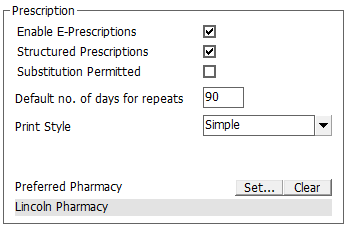
- Check ON 'Enable e-Prescriptions'
- Add the Provider's preferred pharmacy Setup > Provider > Config3 > Edit
Step 2. Create & email the prescription
- Create the prescription (or select one to Repeat) as you would normally do, but check ON or click the 'Email' option

- Select the pharmacy (Setup > Contacts > Pharmacy), orselect 'Lookup' to search for the pharmacy in Healthpoint's Health Service Directory.
- Choose 'Update patient's preferred pharmacy' to put the pharmacy details in the patient's 'GP & Preferred Pharmacy' section in the Registration tab.

- Select 'Send' to email the prescription.
The Prescription now appears in Notes (as usual) and there is also an entry in MailOut showing the email sent. A copy of the actual prescription sent as a PDF attachment is also in the PDF directory, for audit purposes.